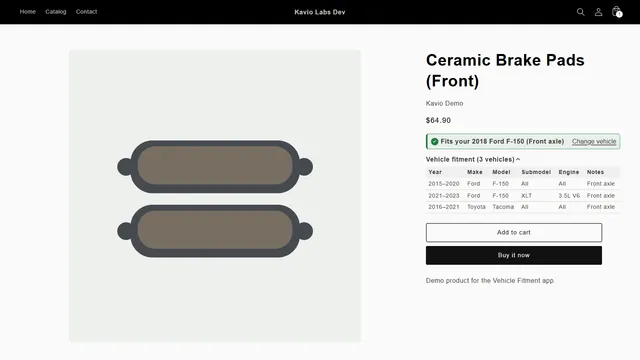




The data model: one row per product and vehicle
A fitment row links one product to one vehicle line: a year or a year range, a make, a model and, where it matters, a submodel (trim) and an engine. A part that fits ten models has ten rows; a part that fits one model from 2015 to 2020 has one row with a year range.
An empty submodel or engine means "all submodels" or "all engines" of that model. Only fill them in when the fitment really differs.
Columns
| Column | Required | Example | Notes |
|---|---|---|---|
| Product (SKU, ID or handle) | yes | KVF-BRAKE-01 | Variation SKUs map to their parent product |
| Year or year range | yes | 2015-2020 | Or separate year_from / year_to columns |
| Make | yes | Ford | Spell makes the same way everywhere |
| Model | yes | F-150 | |
| Submodel / trim | no | XLT | Empty = all |
| Engine | no | 3.5L V6 | Empty = all |
| Notes | no | Front axle | Shown with the fit badge |
| Universal | no | yes | Fits every vehicle; year, make and model can stay empty |
For our WooCommerce plugin the header row looks like this (names are case-insensitive, and comma, semicolon, tab or pipe delimiters are detected):
sku,year,make,model,submodel,engine,notes,universal
The Shopify app takes the product handle, SKU or product ID plus year or year range, make and model, with optional submodel, engine, notes and universal columns; its docs include a sample file.
Clean the data before you import
- One spelling per make and model. "VW", "Volkswagen" and "VOLKSWAGEN" become three makes in the search.
- Year ranges instead of one row per year. Smaller files, and a range counts as one row on row-limited plans.
- No merged cells or notes in the year column. Put comments in the notes column.
- Mark universal parts. Floor mats or phone mounts that fit everything should not need 500 rows.
- Keep a master file. Export after edits in the admin, so your spreadsheet stays the source of truth.
Import with a preview
Import into a staging copy or use a preview first: you want to see the row count and every error before anything changes. Both of our fitment products show a preview and the errors per row, and both can add to or replace existing fitment.
- Export a sample from the product, or start from the sample file in the docs.
- Fill in your rows and save as UTF-8 CSV.
- Upload, read the preview and fix the reported rows.
- Import, then search for two or three vehicles you know and check the fit badge on a few products.
WooCommerce
Vehicle Fitment & YMM Search for WooCommerce
Year, make and model search, My Garage, a fit badge on every product and CSV import for large fitment files.
Shopify
Vehicle Fitment & YMM Search
YMM search on your own collection pages, a fit badge on every product, My Garage and CSV import.