
Sell by Measure
An amount input with a live price, Shopify unit prices and a checkout check for minimum and maximum amounts.
Free planView the app : Sell by Measure
Platforms
 CS-CartAdd-ons and themes for CS-Cart and Multi-Vendor
 OpenCartExtensions and themes for OpenCart 4 and 3
 WooCommercePlugins and themes for WooCommerce
 PrestaShopModules and themes for PrestaShop 8.2 and 9
 ShopifyApps with a free plan
Stores
Shopify app · Vehicle Fitment & YMM Search
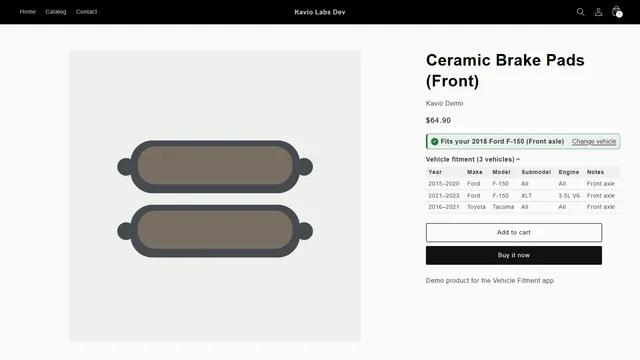
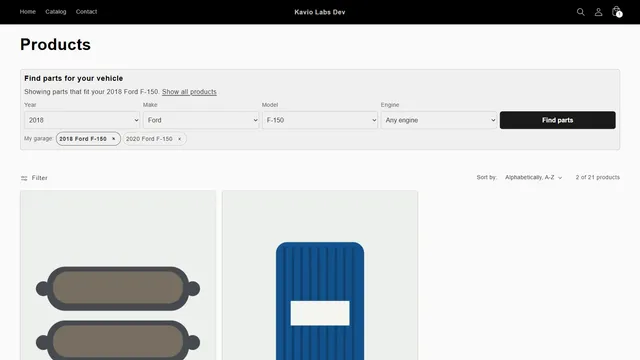
Shoppers pick year, make and model and land on your own collection page with only the parts that fit. Every product page answers the one question that matters: does it fit my vehicle?

The problem
Shopify has no notion of a vehicle. Stores use tags or filters per model, which only work if the shopper already knows which tag to look for.
The product page rarely says clearly whether the part fits, so shoppers guess, order the wrong part and send it back.
Vehicle Fitment & YMM Search
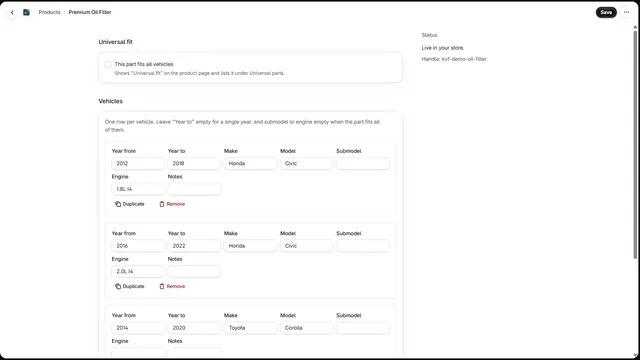
Upload a CSV with product, year or year range, make and model. Check the preview, then import.
Click "Add search block" in the app and save the theme. Put it on the home page and on collections.
Click "Add fit badge" and place it under the price on the product page.
For the home page, collections or any section, with optional submodel and engine.
Checks the shopper’s vehicle on the product page, with your fitment notes.
Up to 10 saved vehicles on the device, switchable with one tap; no account needed.
Every vehicle a part fits, on the product page, readable by search engines.
Year ranges, handles or SKUs; every error and the row count before anything changes.
Point the app at your supplier’s CSV link and it imports the changes every night.
Vehicle Fitment & YMM Search
Shopify search and filters know products, tags and metafields, not vehicles. For a parts store, that leaves shoppers guessing whether a part fits. Hand-built collections per vehicle do not scale, because a part can fit dozens of cars.
Vehicle Fitment & YMM Search adds a year, make and model search, with optional submodel and engine, and a clear answer on every product page. Results open on your own collection pages, so your theme’s design, filters and sorting keep working.
Universal parts stay visible for every vehicle. The storefront part is one small script and stylesheet from Shopify’s CDN, and it makes no calls to our server.
One row per product and vehicle: product handle, SKU or product ID, then year or a year range such as 2015-2020, make and model. Submodel, engine, notes and a universal column are optional. A year range counts as one row, which keeps your row count down.
| product | year | make | model | notes |
|---|---|---|---|---|
| brake-pad-front | 2015-2020 | Ford | F-150 | Front axle |
| oil-filter-a | 2018 | Toyota | Corolla |
There is no vehicle database included. You import the fitment you already have from your suppliers or your own catalog, so shoppers only see vehicles you sell for. A sample file is in the docs, and our fitment CSV guide covers how to prepare data, with common mistakes. Export gives you a CSV back at any time.
| Plan | Fitment rows | Adds |
|---|---|---|
| Free | Up to 300 | Every storefront feature, CSV import with preview, export |
| Basic | Up to 25,000 | E-mail support |
| Pro | Up to 250,000 | Daily supplier feed from a CSV link, priority support |
The free plan works on live stores, and it suits a small specialist store with a few vehicles. See the app page for current prices.
| Collections by hand | Generic filter app | Vehicle Fitment | |
|---|---|---|---|
| Chained year, make, model | No | Sometimes | Yes |
| Fit answer on the product | No | No | Yes |
| My Garage | No | No | Yes |
| Results in your theme | Yes | Varies | Yes |
| Spreadsheet import with errors | No | Varies | Yes |
If you sell for one vehicle platform, one collection per model is enough. Choose an app when parts fit many vehicles, or a shopper needs a yes or no. A similar product exists for WooCommerce.
Results use your own collection pages, so they fit your existing structure. Still, a vehicle search is a shopping tool. To be found for searches such as "2018 F-150 brake pads", write useful collection text and guides, and keep main vehicle ranges in product titles where they are true.
Quality beats size. Use consistent make and model names, add submodel and engine only where they change the fit, and put position in the notes. Start with your best sellers, then extend.
Every Shopify plan, no Plus features, and only product permissions, with no customer or order access. It needs the Online Store channel and a theme with app blocks. On uninstall, the kvf- product tags stay, so links to your collection pages keep working. Shopify removes the app blocks and the fitment metafields, and our server deletes your store’s data. Export your CSV first if you want a copy.
Results open on a collection filtered by a product tag, so test a vehicle with many parts, one with a few, and one with none, and check what your theme shows when a filter returns nothing. A short message on that collection pointing shoppers to support stops an empty result from being a dead end.
Put the search block where drivers start: the home page, and at the top of the collection. Keep the fitment table on the product page, as it lets a shopper with a similar vehicle check for themselves.
Shopify
Year, make and model search for Shopify auto parts stores: fits-your-vehicle badge, fitment table, My Garage and CSV import. Free plan.
Shopify
The most requested products on this platform. Each one has its own page, and you can buy it straight on the sales site.
An amount input with a live price, Shopify unit prices and a checkout check for minimum and maximum amounts.
Engraving previewed on the product photo, monogram styles, an add-on price at checkout and a production sheet.
Prices, licences, full documentation and instant downloads are on the store.
apps.kaviolabs.com · 3 apps, each with a free plan
Vehicle fitment
Built natively for each platform, not ported. Each version has its own product page, documentation and price.
WooCommerce
Year, make and model search, My Garage, a fit badge on every product and CSV import for large fitment files.
Guide
Guide
One row per product and vehicle, year ranges, submodel and engine, universal parts and the errors to avoid.
Read the guideFAQ
From Shopify. The app tags each product with the vehicles it fits, and the search opens your collection page filtered by that tag, with your theme’s design, filters and sorting.
One product and one vehicle line of your file. A year range counts once, so "2015-2020 Ford F-150" for one product is one row.
Yes, on live stores too: up to 300 fitment rows with every storefront feature. Paid plans add rows; Pro adds the daily supplier feed.
The product tags stay on your products, so links to your collection pages keep working.
One row per product and vehicle: handle, SKU or product ID, year or year range, make and model. Submodel, engine, notes and universal are optional.
No. You import the fitment you have, and the app shows each error before anything changes.
The storefront part is one small script and stylesheet from Shopify’s CDN, with no calls to our server.
Pro adds a daily supplier feed from a CSV link.
Plans, screenshots and the full documentation are on apps.kaviolabs.com.
Kavio Labs
The same standards, the same support desk and one licence portal on every platform we build for.
