



Why every platform counts whole items
CS-Cart, OpenCart, WooCommerce, PrestaShop and Shopify all store a cart quantity as a whole number. That number drives everything after it: the line price, the stock reduction, the shipping weight, the order, the invoice and what the payment gateway receives.
So "1.25 kg" is not just a field on the product page. If the quantity is still 1 behind the scenes, the price, the stock and the invoice are wrong unless something else carries the real amount.
The three common workarounds
1. One product, option or variant per amount
You sell "250 g", "500 g" and "1 kg" as separate choices. It is simple and works on every platform, but shoppers cannot buy 1.3 kg, the price per kilo is hidden, and stock is split across packs or managed by hand.
2. An extra input field with a price formula
The quantity box is hidden and a custom field asks for the amount; a formula adds a surcharge. The page looks right, but the order line still says "1", stock goes down by one piece, and shipping weight ignores the amount.
3. A real measured quantity
The amount itself drives the line: price per unit × amount, stock reduced by the amount, shipping weight per unit × amount, and the amount printed on the order and invoice. This is the only approach where cart, order and stock agree, but it has to be done carefully on each platform, because each one stores quantities differently.
How each platform can do it properly
CS-Cart and Multi-Vendor
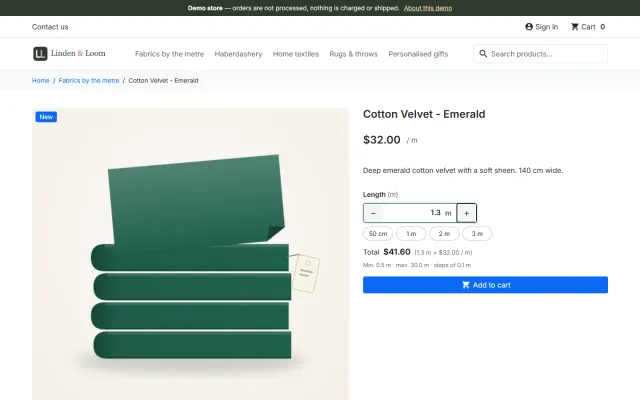
CS-Cart can carry a decimal quantity through cart, checkout and orders when an add-on changes how quantities are validated and priced. Our Sell by Weight & Length add-on adds a quantity field with unit, step (down to 0.001), minimum, maximum and preset buttons, prices lines to the cent and keeps exact stock with a decimal remainder. Payment line items are sent so gateways that accept whole quantities still work.
OpenCart 4 and 3
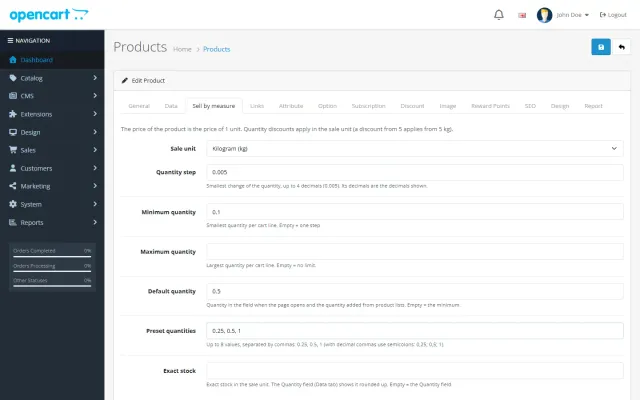
OpenCart stores whole quantities everywhere and has no event inside the cart library. A clean solution therefore keeps the exact quantity and stock next to OpenCart’s own numbers: our extension shows the order line as quantity 1 with the exact line total, and "Quantity: 1.250 kg" and "Price per kg" underneath, while the Quantity field shows the stock rounded up so the product stays in stock.
WooCommerce
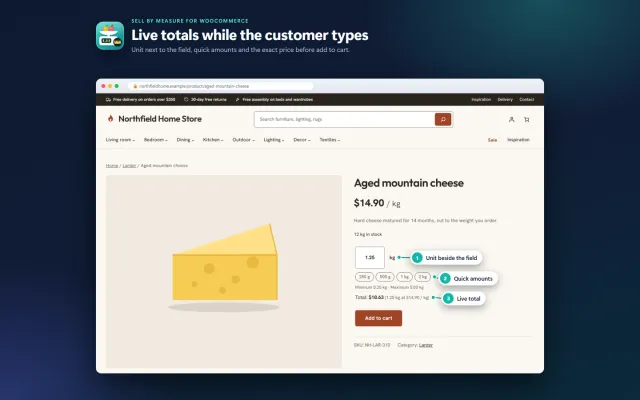
WooCommerce lets a plugin make the quantity itself decimal, including stock in the sale unit (125.5 kg). Our Sell by Measure plugin does that and supports the Cart and Checkout blocks, the Store API and HPOS. Two WooCommerce limits remain: block checkouts hold stock for unpaid orders in whole numbers, and WooCommerce Analytics counts "items sold" as integers (revenue stays exact).
PrestaShop 8.2 and 9
PrestaShop also stores whole numbers in cart, orders and stock. Without overrides, a measured line is best modelled as one piece of 1.25 kg: the amount is part of the line (as a module customization) and its price, weight and stock follow the amount. Our module keeps the exact decimal stock and shows "Weight: 1.25 kg" in cart, checkout (including the 9.2 one-page checkout), e-mails and invoices.
Shopify
Shopify quantities are whole numbers and apps cannot change that. The reliable approach is to sell in steps: with a 10 cm step, 2.5 m is 25 steps, priced by Shopify itself and shown with Shopify’s own unit price ("$12.00 / m"). Our Sell by Measure app adds the amount input, the live price and a checkout rule for minimum and maximum amounts.
Side by side
| Platform | What the order line stores | Stock | Shipping weight |
|---|---|---|---|
| CS-Cart | The decimal quantity (1.250 kg) | Exact, with a decimal remainder | Per unit × amount |
| OpenCart | Quantity 1 + "Quantity: 1.250 kg" detail | Exact stock kept next to the core field | Per unit × amount |
| WooCommerce | The decimal quantity (1.25) | Exact, in the sale unit | Per unit × amount |
| PrestaShop | One piece of 1.25 kg ("Weight: 1.25 kg") | Exact stock kept by the module | Per unit × amount |
| Shopify | Steps (25 × 10 cm) with a unit price | Counted in steps | Per step |
What to check before you choose
- Stock: is it reduced by the real amount, and given back when an order is cancelled?
- Taxes, coupons and discounts: do they apply to the line price exactly as for any other product?
- Payment gateways: do gateways that only accept whole quantities still receive a valid order?
- Shipping: does the shipping weight follow the amount?
- Documents: do the order page, e-mails and invoices show the amount and the unit price?
- Uninstall: what happens to open orders and stock if you remove the extension?
- Core edits: does it change core files or use overrides? Those break on upgrades.
Every product below has real screenshots and full documentation (Shopify: a free plan), so you can check these points before you buy.

CS-Cart
Sell by Weight & Length
Decimal quantities with a unit, step, presets and price per kg or metre, with exact stock down to 0.001.
Decimal quantities in 15 units, preset buttons, a live line total and exact decimal stock, on OpenCart 4 and 3.
WooCommerce
Sell by Measure for WooCommerce
Decimal quantities like 1.25 kg, quick amounts, length × width and exact decimal stock, with the block checkout.
PrestaShop
Sell by Weight & Length for PrestaShop
Amounts like 1.25 kg or 2.40 m with quick amounts, a live total, exact decimal stock and real shipping weight.
Shopify
Sell by Measure
An amount input with a live price, Shopify unit prices and a checkout check for minimum and maximum amounts.