



 OpenCart theme · Volt
An electronics theme that shows the numbers.
Volt is built for stores selling phones, laptops, TVs, audio, gaming, cameras, smart home and accessories, where shoppers compare specs, hunt for deals and want a clear price. A category icon bar, a deal stage with countdowns, product cards with spec meters, a compare tray and a monthly price line. No core changes and no OCMOD.
- v1.0.2
- OpenCart 4.0.2.0 – 4.1.0.4, 3.0.x
- 30-day refund on a first licence
 Volt: Electronics Superstore Theme for OpenCart$59
The problem
Why a general theme sells gadgets short
Electronics shoppers compare before they buy. A general theme gives them a photo and a price, so they open five tabs to line up battery life, storage and screen size, and they buy where the numbers are easiest to find.
They also respond to a deal that looks like a deal: a real saving, a price per month and a clock that runs out. A flat grid hides all three.
Three ways to build an electronics storefront
Volt: Electronics Superstore Theme for OpenCart
How it works
- 01
Install the theme extension
Upload the package in Extensions > Installer, install Volt under Extensions > Extensions > Themes, choose a preset and set Volt as the store theme in System > Settings.
- 02
Name your spec attributes
Spec meters on the cards are built from numeric attributes you name on the settings page, for example Battery, Weight or Screen. Bars are relative to the rest of your catalogue.
- 03
Set up your deals
The deal stage and the countdown tiles run on the end date of the special price you already set on a product. Switch each home section on or off on the settings page.
What you get
Category icon bar and mega panel
Categories marked Show in top menu become an icon bar; their sub-categories open in a panel with a brand column and the best deal of the category.
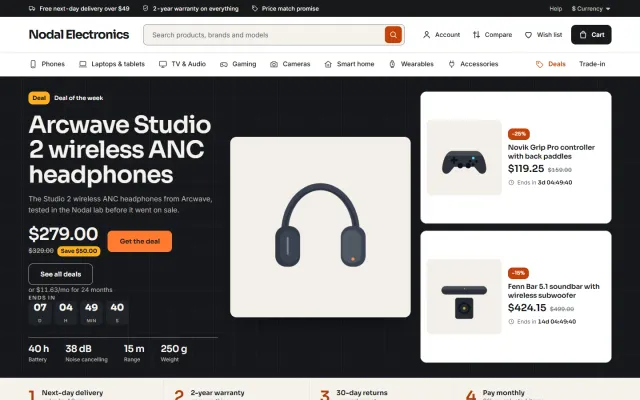
Deal stage with countdowns
A dark band with one big deal (image, price, saving pill, monthly price, countdown and four key specs) and two countdown deal tiles beside it.
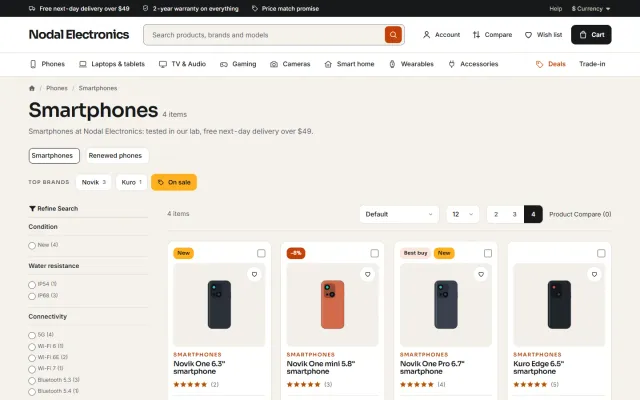
Spec meter cards
Three segmented bars per card, built from numeric attributes you choose. For weight and similar values, a lower number fills more.
Compare tray
A tick on every card collects two to four products in a tray at the bottom of the page; Compare now opens the core compare page.
Product page
Gallery with hover zoom, key specs, spec meters, colour swatches, chips for storage and protection plans, a delivery panel, warranty and returns lines and Frequently bought together.
Four presets, self-hosted fonts
Daylight, Signal, Ember and Carbon change corners, borders, buttons and the whole page tone. Sora and Inter are served from your own store.
Made for
- Phones and tablets
- Laptops and PCs
- TV and audio
- Gaming
- Cameras
- Smart home and accessories
Volt: Electronics Superstore Theme for OpenCart
Screenshots


OpenCart
Volt: Electronics Superstore Theme for OpenCart at a glance
Electronics and gadgets theme for OpenCart 4.x and 3.0.x: category icon bar with brand and top-deal mega panels, a dark deal stage with countdown deal…
- Price
- $59 one-time
- Version
- 1.0.2
- Compatible with
- OpenCart 4.0.2.0 – 4.1.0.4, 3.0.x
- PHP
- 7.4 or newer (as required by your OpenCart version)
- Licence
- One store, OpenCart 4 and 3 packages, 12 months of updates
- Refund
- 30-day refund on a first licence
FAQ
Questions and answers
Is the monthly price a real payment plan?
No. The line "or $41.67/mo for 24 months" is a display line for prices above a minimum you set; checkout charges the full price. Connect a financing provider for real instalments.
Does the compare tray work without extra extensions?
Yes. It collects products in the browser and opens the core OpenCart compare page.
Does Volt change OpenCart core files or use OCMOD?
No. It is a theme extension on OpenCart 4 and a theme folder plus a theme extension on OpenCart 3. A licence problem never blocks the store or the admin.
Which versions does it support?
OpenCart 4.0.2.0 to 4.1.x and 3.0.3.x to 3.0.5.x. One licence covers both packages.
Why does a card show no spec bars?
The bars come from the numeric attributes you name on the settings page. Products without those attributes show a plain card.
Give every deal the numbers shoppers look for
The product page has screenshots of every preset, the full documentation and the changelog.
Kavio Labs
Also by Kavio Labs
The same standards, the same support desk and one licence portal on every platform we build for.