



 PrestaShop theme · Volt
An electronics theme where every deal shows its numbers.
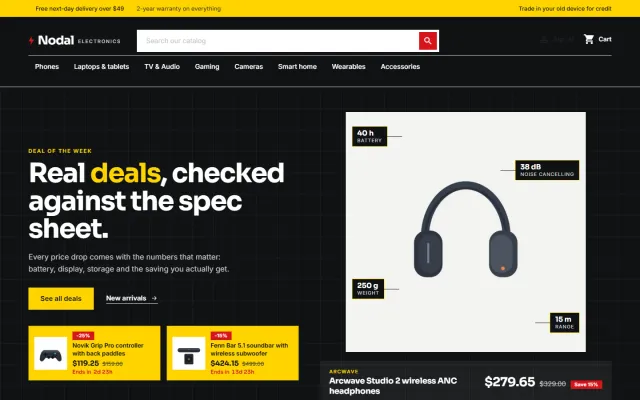
Volt is built for phone, laptop, audio, gaming, camera and smart-home shops, from a single brand store to a full electronics superstore. A dark deal stage with spec callouts and a countdown, a department bar, spec cards with a saving pill and a monthly price line, and a trade-in band. A child theme of Classic, so one package runs on PrestaShop 8.2 and 9.x.
- v1.0.0
- PrestaShop 8.2 – 9.x
- 30-day refund on a first licence
 Volt: Electronics Theme for PrestaShop$89
The problem
Why a general theme sells gadgets short
Electronics shoppers check the numbers before buying: battery, storage, screen size and the real saving. A general theme shows a picture and a price and leaves the rest to the description.
A deal also needs to look like one. Without a visible saving, a price per month and a countdown, a sale price reads like any other price.
Three ways to build an electronics storefront
Volt: Electronics Theme for PrestaShop
How it works
- 01
Install and regenerate the pictures
Enable Volt, then regenerate thumbnails once in Design > Image Settings: it uses square picture sizes. Import the demo content "Nodal Electronics" with one button to see the theme working.
- 02
Pick a preset
Daylight, Signal, Ember or Carbon. They change corners, borders, buttons and the tone of the whole page, not only the colour.
- 03
Add spec features and timed discounts
Cards show up to three spec chips from product features whose value contains a number, and a countdown when a discount has an end date in the future.
What you get
Deal stage
A dark blueprint band with your headline and two buttons, the deal of the week with four spec callouts, the real saving, a monthly line and a countdown, plus two deal tiles.
Department bar
The main menu on its own row under the logo and a wide search field, with an accent underline and a full-width panel for sub-categories.
Spec cards
Square product wells with the brand, up to three spec chips, a big price, a saving pill, the regular price, an or $x/mo line, a stock note and a sale countdown.
Product page and trade-in band
A square gallery, key spec tiles, colour swatches and storage chips, a big Add to cart, and a band above the footer for your trade-in or service offer.
Child theme of Classic
It overrides only a few templates and adds one stylesheet and one script. A small companion module holds the presets, home sections and demo content. No overrides of core or other modules.
One-page checkout ready
Works with the classic five-step checkout and with the PrestaShop 9.2 one-page checkout, in the Volt look. Sora and Inter are served from your own shop.
Made for
- Phones and tablets
- Laptops
- Audio
- Gaming
- Cameras
- Smart home
Volt: Electronics Theme for PrestaShop
Screenshots


PrestaShop
Volt: Electronics Theme for PrestaShop at a glance
Electronics and gadgets theme for PrestaShop 8.2 and 9.x: a dark deal stage with spec callouts and countdown deal tiles, square product wells, key specs…
- Price
- $89 one-time
- Version
- 1.0.0
- Compatible with
- PrestaShop 8.2 – 9.x
- PHP
- 7.2.5 or newer (8.1+ for PrestaShop 9)
- Licence
- One store, no subscription, 12 months of updates
- Refund
- 30-day refund on a first licence
FAQ
Questions and answers
Does Volt change PrestaShop files?
No. It is a child theme of Classic plus a small companion module. It edits no core files, other modules or Classic, and uses no overrides.
Is the "or $x/mo" line a real payment plan?
No. It is the price divided by the number of months you set, shown as information. Connect a financing provider for real instalments. Volt does not add a compare tray or versus bars.
Why do some cards have no spec chips?
Chips come from product features whose value contains a number and is short, such as 29 h. Add such features to the product or switch chips off in the configuration.
Does it work with Make an Offer, Product Personalizer and Sell by Weight & Length?
Yes. The offer button appears next to Add to cart, the personalizer form sits above the quantity row with its preview on the product picture, and the amount field of Sell by Weight & Length replaces the quantity field.
What happens when the licence is not valid?
The shop keeps working and the templates and styles stay. The settings page shows the licence status and some home page sections and presets are switched off until the licence is valid again.
Put the numbers shoppers check at the front of every deal
The product page has every preset, screenshots and the documentation.
Kavio Labs
Also by Kavio Labs
The same standards, the same support desk and one licence portal on every platform we build for.