



 WooCommerce theme · Volt
An electronics theme where every deal shows its numbers.
Volt is a classic, conversion-first block theme for phone, laptop, audio, gaming, camera and smart-home stores. A dark deal stage with spec callouts and a countdown, square product wells, key-spec chips on every card, a saving pill, a monthly price line, an icon department bar, a brand row and a trade-in band. The same identity as Volt for OpenCart and PrestaShop.
- v1.0.0
- WooCommerce 10.1 – 11.2, WordPress 6.7+
- 30-day refund on a first licence
 Volt: Electronics & Gadgets Deal Theme for WooCommerce$69
The problem
Why a general theme sells gadgets short
Electronics shoppers check the numbers before buying: battery, storage, screen size and the real saving. A general theme shows a photo and a price and leaves the rest to the description.
A deal also has to look like one. Without a visible saving, a price per month and a countdown, a sale price reads like any other price.
Three ways to build an electronics storefront
Volt: Electronics & Gadgets Deal Theme for WooCommerce
How it works
- 01
Install and pick a style
Upload the zip in Appearance > Themes, activate Volt and choose Daylight, Signal, Ember or Carbon in Appearance > Editor > Styles.
- 02
Import the demo content
One click creates Nodal Electronics: 40 products in 30 categories, six brands, specifications, three timed deals, 140 reviews, four pages and four posts. One click removes it again.
- 03
Use standard WooCommerce data
Spec chips come from product attributes, the saving pill and countdown from the sale price and its end date, and the monthly line from the price. Everything is editable in the Site Editor.
What you get
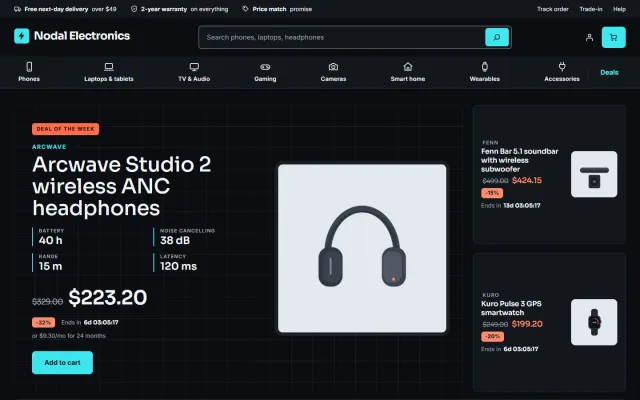
Deal stage
The deal of the week with four spec callouts, the saving, an or $x/mo line and a countdown, plus two deal tiles, as a dark band on the home page.
Department bar
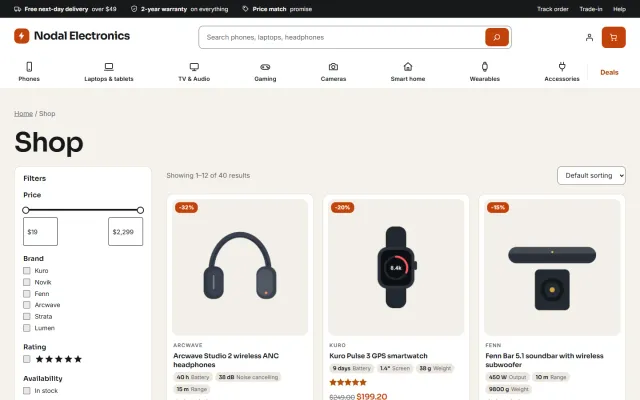
A promise bar, logo, wide product search, account, mini cart and a department bar with icons, drop-down menus and a Deals link.
Spec cards
Key spec chips taken from product attributes, a saving pill, the sale countdown and the monthly line on shop, category, search and home cards.
Product page
Gallery, price with saving, countdown, monthly line, spec tiles, add to cart, tabs and related products.
Cart and Checkout blocks
The WooCommerce Cart and Checkout blocks, styled, with a minimal secure checkout header. Neutral to High-Performance Order Storage.
Four styles, self-hosted fonts
Daylight, Signal, Ember and Carbon all meet WCAG AA contrast. Sora and Inter are served from your own site, with no external requests.
Made for
- Phones and tablets
- Laptops
- Audio
- Gaming
- Cameras
- Smart home
Volt: Electronics & Gadgets Deal Theme for WooCommerce
Screenshots

WooCommerce
Volt: Electronics & Gadgets Deal Theme for WooCommerce at a glance
Block theme for electronics and gadget stores where every deal shows its numbers: a dark deal stage with spec callouts and a countdown, product cards with…
- Price
- $69 one-time
- Version
- 1.0.0
- Compatible with
- WooCommerce 10.1 – 11.2, WordPress 6.7+
- PHP
- 7.4 – 8.3
- Licence
- One store, no subscription, 12 months of updates
- Refund
- 30-day refund on a first licence
FAQ
Questions and answers
Is the monthly price a real payment plan?
No. It is a display line worked out from the price. Connect a financing provider for real instalments.
Does it work with Make an Offer and Sell by Measure?
Yes. The Make an Offer button sits under the add-to-cart form and takes the style colours. Both are separate products and Volt does not depend on them.
Does it work with the classic cart and checkout?
Volt is designed for the WooCommerce Cart and Checkout blocks, which are the WooCommerce default.
Which versions does it need?
WooCommerce 10.1 to 11.2 on WordPress 6.7 or newer, with PHP 7.4 to 8.3. It is a block theme, so full site editing is part of it.
What happens when the licence expires?
The store keeps working. Templates, patterns and styles stay and the admin is never blocked; updates, the demo importer and the live countdown script need a valid licence, and timers then show the time left when the page was built.
Put the numbers shoppers check at the front of every deal
The product page has screenshots of every style, the full documentation and the changelog.
Kavio Labs
Also by Kavio Labs
The same standards, the same support desk and one licence portal on every platform we build for.