



 WooCommerce theme · Kite
A toy store theme where parents shop by age and see safety at a glance.
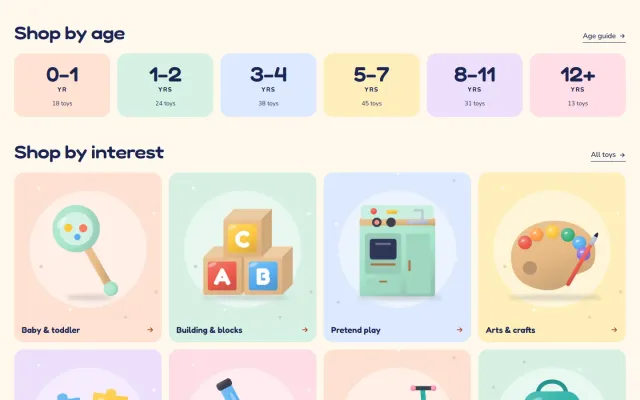
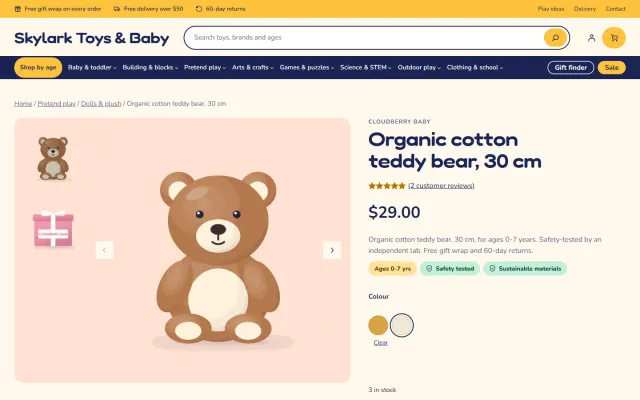
Kite is a block theme for toy, kids and baby stores, built for parents and gift givers who shop by age. A Shop by age panel and growth chart, a gift finder that works in the browser, pastel toy-box cards with an age chip and a safety shield, a boxed small-parts warning, a gift wrap line and a Make it a gift set builder. Fredoka and Nunito are self-hosted.
- v1.0.1
- WooCommerce 10.1 – 11.2, WordPress 6.7+
- 30-day refund on a first licence
 Kite: Toys & Baby Store Theme for WooCommerce$69
The problem
Why a general theme sells toys short
Parents ask what suits a five-year-old, and gift givers start from a budget. A general theme offers categories and a search box, so they scroll a long grid hoping to spot something suitable.
Safety has to be visible too. A small-parts warning or a safety-tested note belongs on the card and next to the buy button, not buried in a long description.
Three ways to build a toy storefront
Kite: Toys & Baby Store Theme for WooCommerce
How it works
- 01
Install and pick a style
Upload the zip in Appearance > Themes, activate Kite, then choose Playroom, Nursery, Woodland or Bedtime in Appearance > Editor > Styles.
- 02
Import the demo content
One click creates Skylark Toys & Baby: 62 products from eight fictional brands in 29 categories, 17 with colour or size variations, the Age and Interest attributes, 200 reviews, seven pages and four posts. One click removes it again.
- 03
Add your age data
A global attribute named Age with steps such as 0-12 months and 3-4 years drives Shop by age, the growth chart and the age chips. Safety, Warning and Pieces attributes feed the shields, the warning box and the price per piece.
What you get
Shop by age and growth chart
The first menu item opens the age steps as tiles, and the home page shows the same steps as bars that grow taller with age, each linking to its filter.
Gift finder
Pick an age, an interest and a budget and the matching gifts appear at once. The browser filters up to 120 in-stock products, so there is no page reload.
Pastel toy-box cards
Six pastel wells with an age chip, a safety shield, colour dots, a price per piece, the end date of a sale and New, Eco and Only 3 left badges.
Safety chips and warning box
Safety chips and a boxed small-parts warning above the add to cart button, built from attributes you fill in yourself.
Gift set builder and gift wrap
Three toys with checkboxes, a running total and one Add gift set to cart button, plus a gift wrap line under the buy button.
Cart and Checkout blocks, four styles
The WooCommerce Cart and Checkout blocks are styled with a minimal secure header. All four styles meet WCAG AA contrast, and the fonts are served from your own site.
Made for
- Toys
- Baby and nursery
- Kids' clothing
- Books and games
- Party and gifts
- Outdoor play
Kite: Toys & Baby Store Theme for WooCommerce
Screenshots

WooCommerce
Kite: Toys & Baby Store Theme for WooCommerce at a glance
Block theme for toy, kids and baby stores: a Shop by age panel and growth chart, a gift finder by age, interest and budget, pastel toy-box product cards…
- Price
- $69 one-time
- Version
- 1.0.1
- Compatible with
- WooCommerce 10.1 – 11.2, WordPress 6.7+
- PHP
- 7.4 – 8.3
- Licence
- One store, no subscription, 12 months of updates
- Refund
- 30-day refund on a first licence
FAQ
Questions and answers
Does Kite work with the Cart and Checkout blocks?
Yes. Both are styled by the theme and nothing replaces them. The theme never reads or writes orders, so it is neutral to High-Performance Order Storage.
Which versions does it need?
WooCommerce 10.1 to 11.2 on WordPress 6.7 or newer, with PHP 7.4 to 8.3. It is a block theme, so full site editing is part of it.
Why do I not see age chips or Shop by age?
They need a global attribute called Age with the standard terms and products that use it. The demo content creates both.
Does it certify product safety?
No. The shields and the warning box show the Safety and Warning attributes you enter, so only publish claims you can prove.
Does it work with Product Personalizer and Make an Offer?
Yes. A child’s name field appears in the product summary and the Make an Offer button sits under Add to cart, both in the style colours. They are separate products and Kite does not depend on them.
What happens when the licence is not valid?
The store keeps working and the admin is never blocked. Colour swatches, the gift finder form, the gift set button, the demo importer and updates need a valid licence; a new install has a 14-day start period.
Help parents and gift givers find the right toy faster
The product page has screenshots of every style, the full documentation and the changelog.
Kavio Labs
Also by Kavio Labs
The same standards, the same support desk and one licence portal on every platform we build for.