EU E-Invoicing
XRechnung, ZUGFeRD/Factur-X and Peppol BIS 3.0 from every order, created on your own server.
Platforms
 CS-CartAdd-ons and themes for CS-Cart and Multi-Vendor
 OpenCartExtensions and themes for OpenCart 4 and 3
 WooCommercePlugins and themes for WooCommerce
 PrestaShopModules and themes for PrestaShop 8.2 and 9
 ShopifyApps with a free plan
Stores
WooCommerce guide · Sell by Measure
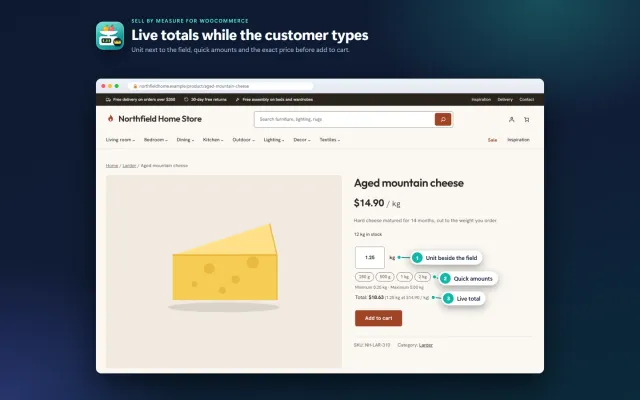
Customers buy exactly 1.25 kg of cheese, 2.6 m of fabric or 3.33 m² of flooring. The price is per unit, the total updates as they type, and stock goes down by the exact amount.

The problem
WooCommerce counts quantities in whole items. The quantity field on the product page and in the cart accepts 1, 2 or 3, and stock is stored and reduced as whole numbers.
Shops that sell by weight or length therefore usually pick one of three workarounds. They differ a lot in what the customer sees and in what happens to stock.
Sell by Measure for WooCommerce
In Product data > Sell by measure, choose one of 15 units (kg, g, lb, oz, m, cm, ft, yd, in, m², ft², L, ml, gal, fl oz). The regular price becomes the price of one unit.
Step (up to 4 decimals), minimum, maximum, default amount and up to 8 quick-amount buttons, per product or as category defaults.
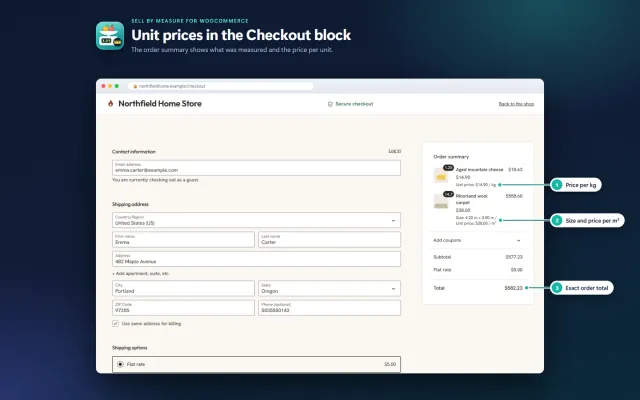
Customers type 1.25 or tap "500 g", see the live total, and the exact amount flows through cart, checkout, order and stock.
Weight, length, area or volume, with the amount snapped to your step.
The total updates on the product page as the customer types or taps a quick amount.
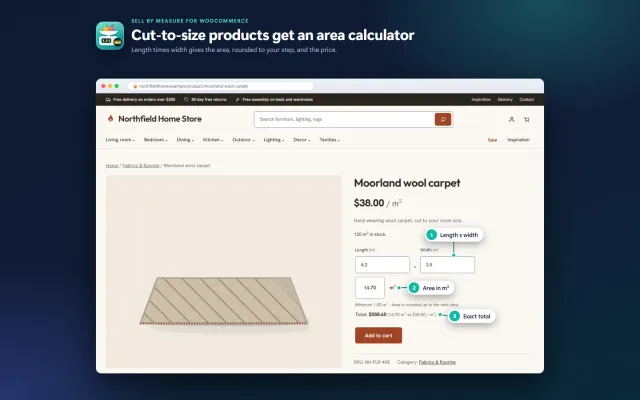
For m² and ft² products, customers enter length and width and get the area.
Stock is kept in the sale unit (125.5 kg). Orders reduce it exactly, cancellations restore it.
Works with the Cart and Checkout blocks, the classic shortcodes, the Store API and HPOS.
Enter the weight of one unit; WooCommerce multiplies it by the quantity.
Sell by Measure for WooCommerce
WooCommerce quantities are whole numbers by default. A developer can loosen that with a filter, but the storefront, cart, block checkout, stock, order screen and Store API all need matching work. Most calculator plugins take another route: they keep quantity 1 and change the price. The order then says "1 × Cheddar", and stock does not fall by what you sold.
Sell by Measure uses real decimal quantities. The order holds 1.3 kg, stock goes from 10 to 8.7 kg, and the WooCommerce REST and Store APIs report 1.3. Whatever reads your orders, from invoice plugins to e-mails, sees the true amount.
Add to cart on product lists adds the default amount. Length × width products show Enter size and open the product page, and sized lines cannot be changed in the cart, since the customer adds a new size instead. Products sold per piece stay per piece: 1.5 mugs are rejected.
In Product data, under Sell by measure, choose a sale unit. The regular price becomes the price of one unit. There are 15 units: kg, g, lb, oz, m, cm, ft, yd, in, m², ft², L, ml, gal and fl oz.
| Field | Example | Meaning |
|---|---|---|
| Quantity step | 0.05 | Up to 4 decimals. Empty means 0.01. |
| Minimum / maximum | 0.1 / 5 | Per cart line. Stock still applies. |
| Default quantity | 0.5 | Shown on load, and added from lists. |
| Quick amounts | 0.25, 0.5, 1, 2 | Up to 8 buttons. |
| Length x width | On | m² and ft² only. |
For a whole department, set these once on the category: products set to Use the category default take the settings of their first category with a unit. Choose Whole items to exempt a product.
Keep stock in the sale unit, decimals allowed. For shipping, enter the weight of one unit: 1 kg for a product sold per kg, and WooCommerce multiplies by the quantity.
| Variations (250 g, 500 g) | Price calculator | Sell by Measure | |
|---|---|---|---|
| Any amount | No | Yes | Yes, to your step |
| Order quantity | Whole | Usually 1 | The real amount |
| Stock in real units | Per variation | Often not | Yes, decimal |
| Length × width | No | Yes | Yes |
| Multi-dimension formulas | No | Often | Length × width only |
For a few fixed pack sizes, variations are free and enough. A dedicated calculator can be better if you need volume or complex formulas. Choose real quantities when stock accuracy and readable orders matter. Our sell-by-weight guide compares the approaches.
Food stores can pair it with the Pantry theme, which styles its quantity box and live total. Rugs and flooring suit Hearth. EU E-Invoicing takes decimal quantities and units as well. Get Sell by Measure on the store.
WooCommerce 10.1 to 11.2 on WordPress 6.7 or newer, PHP 7.4 to 8.3. It supports HPOS, Cart and Checkout blocks, block and classic themes, and Store API. There are no template overrides, and two small scripts load only where needed. Simple and variable products are supported. Settings stay on uninstall unless you tick Remove data on uninstall.
| Product | Unit | Step | Quick amounts |
|---|---|---|---|
| Cheese or deli | kg | 0.05 | 0.25, 0.5, 1 |
| Coffee | g | 50 | 250, 500, 1000 |
| Fabric | m | 0.1 | 1, 2, 5 |
| Rope or cable | m | 0.5 | 5, 10, 25 |
| Flooring | m² | 0.01 | Length × width on |
| Paint | L | 0.25 | 0.75, 1, 2.5 |
Set a minimum that matches how you actually cut or weigh. A step of 0.001 kg looks precise, but if your scales or staff work in 50 g steps, offer those. Round numbers also make the live total easier to read on a phone.
For cut goods, say on the page whether you sell one continuous piece. Two orders of 2 m and 3 m may not be the same as one length of 5 m.
Delivery matters too. Weight-based shipping needs the weight of one unit on the product, and bulky rolls may need a shipping class of their own.
WooCommerce
Sell products by weight, length, area or volume with decimal quantities, unit prices, step/min/max and a live price on the product page (HPOS + Cart/Checkout blocks).
WooCommerce
The most requested products on this platform. Each one has its own page, and you can buy it straight on the sales site.
XRechnung, ZUGFeRD/Factur-X and Peppol BIS 3.0 from every order, created on your own server.
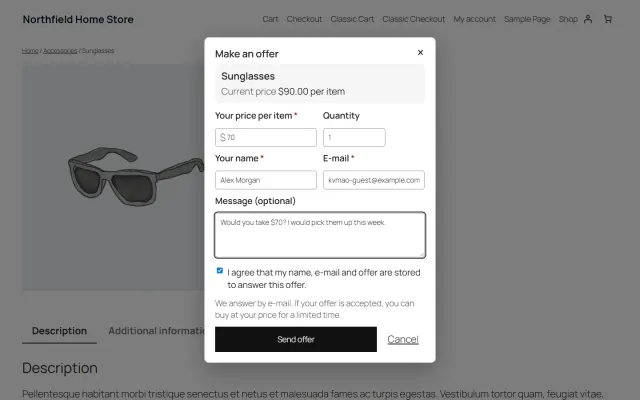
A Make an offer dialog with counter-offers and hidden rules; the agreed price is enforced only in that shopper’s cart.
Year, make and model search, My Garage, a fit badge on every product and CSV import for large fitment files.
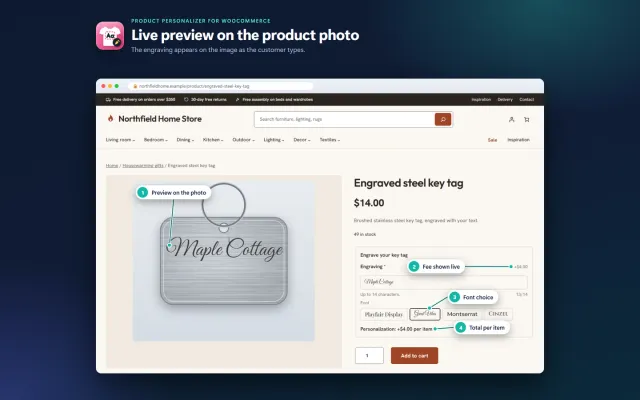
Names, dates and monograms previewed on the product image, with server-checked fees and the block checkout.
A classic, conversion-first block theme for parts stores, with a garage finder, a fit check on every product and four styles.
A warm, photo-led block theme for furniture and homeware, with shop by room tiles, filters and four styles.
Prices, licences, full documentation and instant downloads are on the store.
woocommerce.kaviolabs.com · 7 plugins · 11 themes
Sell by weight
Built natively for each platform, not ported. Each version has its own product page, documentation and price.
CS-Cart
Decimal quantities with a unit, step, presets and price per kg or metre, with exact stock down to 0.001.
Decimal quantities in 15 units, preset buttons, a live line total and exact decimal stock, on OpenCart 4 and 3.
PrestaShop
Amounts like 1.25 kg or 2.40 m with quick amounts, a live total, exact decimal stock and real shipping weight.
Shopify
An amount input with a live price, Shopify unit prices and a checkout check for minimum and maximum amounts.
Guide
Guide
How five platforms handle 1.25 kg or 2.5 m, the usual workarounds and what to check before you choose.
Read the guideFAQ
Only with workarounds such as one variation per amount. WooCommerce itself counts quantities and stock in whole items.
Yes. Sell by Measure supports the Cart and Checkout blocks, the classic shortcodes, the Store API and High-Performance Order Storage (HPOS).
Yes. Only products with a sale unit use decimal quantities; every other product keeps whole quantities.
Variations use the parent product’s unit and limits. Each variation has its own price per unit, and the live total follows the selected variation.
Orders are never changed. Without the plugin WooCommerce treats quantities as whole numbers again, so finish open orders with decimal quantities first.
Fixed product coupons apply per unit of quantity, the same as for 2 pieces. Percentage and cart coupons work as usual.
WooCommerce Analytics stores items sold as integers. Revenue is exact.
Yes, for m² and ft² products. The quantity is the area rounded up to your step.
Yes. Category defaults have the same fields, and products can inherit them or opt out.
See the product, cart and admin screens and read the documentation on the product page.
Kavio Labs
The same standards, the same support desk and one licence portal on every platform we build for.