Advanced Commission Rules
Commission by vendor, category, product, price or monthly sales on top of your vendor plans, with a simulator.
Platforms
 CS-CartAdd-ons and themes for CS-Cart and Multi-Vendor
 OpenCartExtensions and themes for OpenCart 4 and 3
 WooCommercePlugins and themes for WooCommerce
 PrestaShopModules and themes for PrestaShop 8.2 and 9
 ShopifyApps with a free plan
Stores
Multi-Vendor · Vendor Payouts Automation
Weekly, two-weekly or monthly payouts with a hold period for refunds, a minimum amount and payout details per vendor. You approve a batch, download the payment file and mark it paid. Built on core vendor accounting, without a second ledger.
The problem
Multi-Vendor keeps vendor balances, but paying them is up to you: there is no schedule, no hold period for refunds, no place for bank details and no payment file.
So most marketplaces pay from a spreadsheet: export balances, check refunds by hand, copy IBANs, pay, and hope nobody gets paid twice.
Vendor Payouts Automation
Choose weekly, every two weeks, monthly or manual payouts per vendor plan or vendor, a hold period after order completion and a minimum payout amount.
On payout day a cron job creates a payout request for each vendor above the minimum. Each request is a core withdrawal, so it cannot be paid twice.
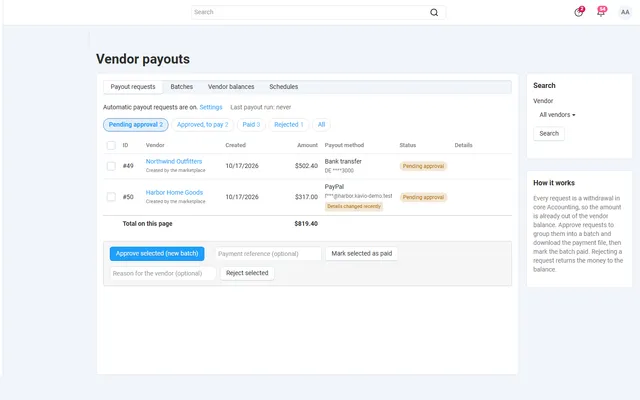
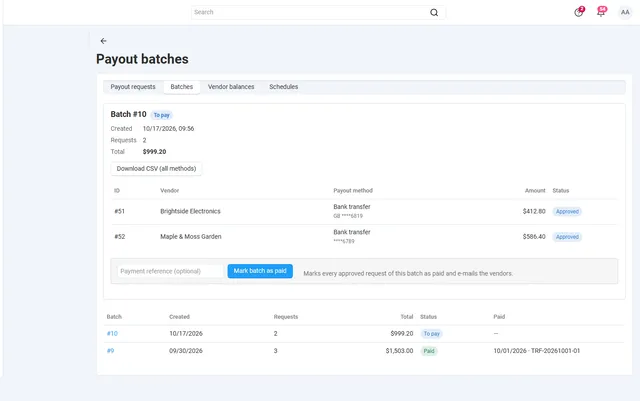
Approve requests into a batch, download the CSV, PayPal Payouts or SEPA XML file, pay, and mark the batch paid with your reference. Vendors get e-mails and statements.
Weekly, every two weeks, monthly or manual, per vendor plan or per vendor.
Money becomes available only after the hold period, and small balances wait for the minimum.
Bulk approve, reject and mark paid. Rejected requests return the money to the vendor balance.
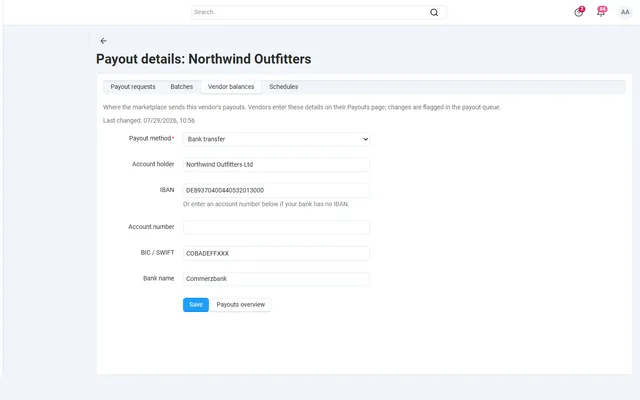
Bank or PayPal details per vendor, stored encrypted, with alerts when they change.
CSV, PayPal Payouts and SEPA XML files for the approved batch.
A Payouts page in the vendor panel with requests, history and monthly statements.
Vendor Payouts Automation
Multi-Vendor already knows what you owe each seller. The Accounting page adds orders, subtracts commission and refunds, and keeps a balance per vendor. What it does not do is decide when that balance should be paid, keep money back while refunds are still possible, store the seller’s bank details or produce a file your bank can read.
With a few sellers, a monthly export is fine. With 30 or 50, payout day becomes a shift of balance checks, copied IBANs and single transfers, and the usual mistakes follow: paying a vendor for an order that gets refunded next week, paying twice, or paying a bank account that was changed yesterday by someone who should not have changed it.
Vendor Payouts Automation adds the routine around core accounting. It does not keep a second ledger: every payout request is a core withdrawal, so the balance on the Accounting page stays the only number that counts.
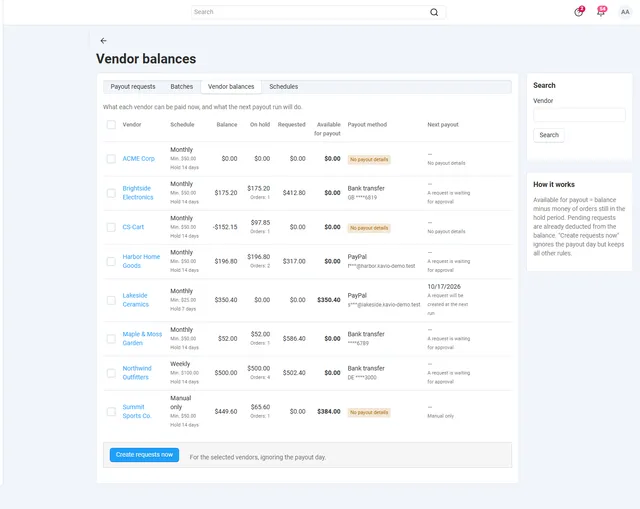
Vendors follow this on a Payouts page next to Accounting: balance, money on hold, amount available, next payout date, history and monthly statements. That page is usually what stops the "when do I get paid?" tickets. If a vendor was skipped, the Vendor balances page gives the reason in the last column, for example Below the minimum payout, No payout details or A request is waiting for approval.
Automatic requests are off after installation on purpose. Review the Vendor balances page, ask vendors to enter their details, set up cron, and only then turn them on. The run takes one daily cron call; without cron it also starts at most every 15 minutes while administrators or vendors work in their panels, never on the storefront.
| Setting | Default | What to think about |
|---|---|---|
| Payout frequency | Monthly | Weekly, every two weeks, monthly or manual only. Can differ per vendor plan and per vendor. |
| Minimum payout | 50 | Below it, money stays in the balance. Keeps bank fees from eating small payouts. |
| Hold period | 14 days | Match it to your return window. Longer means fewer negative balances after refunds, but slower payment for sellers. |
| Hold starts at | Complete | Orders that count for payouts but have not reached this status stay on hold. |
| Require payout details | On | Vendors without details are skipped and listed as such. |
| Flag changed details | 7 days | A changed account just before a payout is a common fraud pattern, so such requests carry a flag in the queue. |
A vendor’s own schedule beats the plan’s, and the plan’s beats the add-on settings. That is how you give a large seller weekly payouts without changing anything for the rest.
It does not send money. There is no direct connection to Stripe Connect, the PayPal Payouts API or Wise; you pay with the file and then mark the batch paid. That is a deliberate first step: you stay the one who releases funds.
All amounts use the store’s primary currency, and refunds after a payout are handled by core accounting: the next payout is smaller, and a negative balance blocks payouts until it is positive again. There is nothing on the storefront.
If you use Direct Customer-to-Vendor Payments or Stripe Connect, the add-on still works, but it only sees what is left in the balance after the checkout split, for example negative commission.
The add-on needs Multi-Vendor. On CS-Cart Standard or Ultimate the installation is refused, because vendor balances do not exist there.
| Spreadsheet | Split at checkout | This add-on | |
|---|---|---|---|
| Who moves the money | You, one transfer at a time | The payment provider | You, from one batch file |
| Hold period for refunds | By hand | Depends on the provider | Built in, per plan or vendor |
| Needs a specific gateway | No | Yes | No |
| History in the store | No | Partly | Yes: batches, statements, references |
| Double payment protection | None | Provider | Core withdrawal, one request per period |
If your gateway supports marketplace splits and your sellers are happy being paid per order, a split can be simpler. Payouts on a schedule suit marketplaces that want to hold money through the return window, or that pay by bank transfer. The two can coexist.
A typical stack: Advanced Commission Rules decides the commission, this add-on pays out what remains, and Vendor KYC & Verification can hold payouts until a seller is verified. The full list is on the Multi-Vendor add-ons page; you can buy Vendor Payouts Automation on the store.
Multi-Vendor 4.17.2 to 4.21.x on PHP 7.2.5 to 8.3, as your CS-Cart version supports. The SEPA file needs the PHP XMLWriter extension, which almost every host has enabled. No core files or core tables are changed: installation adds its own tables, two privileges and four e-mail templates. Uninstalling removes those, and the withdrawals it created stay in core accounting, so balances do not move.
CS-Cart
Scheduled vendor payouts for Multi-Vendor with hold periods, minimum amounts, an approval queue, CSV, PayPal and SEPA payout files and vendor statements.
CS-Cart
The most requested products on this platform. Each one has its own page, and you can buy it straight on the sales site.
Commission by vendor, category, product, price or monthly sales on top of your vendor plans, with a simulator.
Decimal quantities with a unit, step, presets and price per kg or metre, with exact stock down to 0.001.
A Make an offer button with counter-offers, deadlines and a single-use agreed price; vendors answer their own offers.
Text, photo and choice fields on print areas with a live preview, server-rendered proofs and surcharges.
XRechnung, Factur-X/ZUGFeRD and Peppol BIS 3.0 e-invoices and credit notes from every order.
Up to three reminders, single-use coupons, one-click cart restore and recovered revenue per reminder.
Prices, licences, full documentation and instant downloads are on the store.
cs-cart.kaviolabs.com · 98 add-ons · 29 themes
FAQ
No. It prepares the payouts: requests, batches and payment files. You pay through your bank or PayPal and mark the batch paid.
No. It builds on it. Every payout request is a core withdrawal, so vendor balances and accounting stay the single source of truth.
The hold period exists for that case: orders only count towards a payout once the hold period after completion has passed.
Multi-Vendor (and Multi-Vendor Ultimate) 4.17.2 to 4.21.x. It is a marketplace add-on, so it does not install on plain CS-Cart.
No. A request is a core withdrawal and leaves the balance the moment it is created. The run creates at most one request per vendor and period, and a paid request cannot be paid or rejected again.
Part of the balance belongs to orders inside the hold period, or to orders that have not reached the hold-start status yet. The Vendor balances page shows the amount on hold and the number of orders.
Yes. Core withdrawal requests appear in the payout queue as Requested by the vendor and go through the same approval, batch and files.
Encrypted with your store’s encryption key, masked in lists and shown in full only on the payout details page and in the files you download. Vendors only see their own details.
Yes. Those add-ons pay vendors at checkout and record it in accounting, so the payout covers only what is left in the balance.
The product page has the full documentation, screenshots of every screen and the changelog.
Kavio Labs
The same standards, the same support desk and one licence portal on every platform we build for.