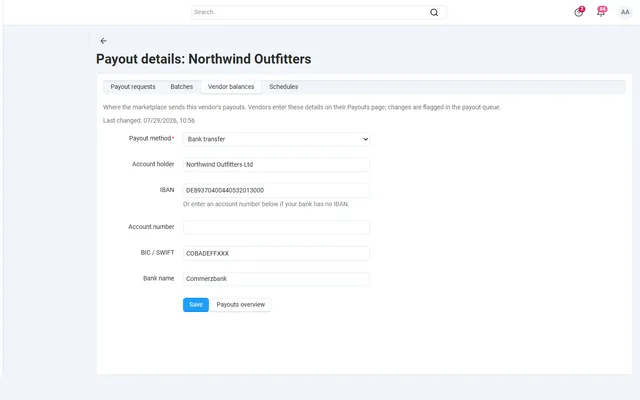
Vendor Payouts Automation
Payout schedules, hold periods, approval batches and SEPA or PayPal payout files, on top of core vendor accounting.
Platforms
 CS-CartAdd-ons and themes for CS-Cart and Multi-Vendor
 OpenCartExtensions and themes for OpenCart 4 and 3
 WooCommercePlugins and themes for WooCommerce
 PrestaShopModules and themes for PrestaShop 8.2 and 9
 ShopifyApps with a free plan
Stores
CS-Cart guide · Advanced Promotions
Buy 2 get the cheapest free, every third item half price, 10% off from 3 items and 15% from 5, lunch-hour deals on weekdays. New conditions and bonuses inside the promotion editor you already use.

The problem
CS-Cart promotions cover simple discounts and coupons. Retail classics such as "buy 2, get the cheapest free" or "every third item half price" need workarounds or one add-on per condition.
And on a marketplace, every vendor suborder has to get exactly its share of the discount.
Advanced Promotions: Buy X Get Y, Tiers, Schedules
Open Marketing > Promotions and pick the new conditions and bonuses next to the core ones.
By products, categories with subcategories or Multi-Vendor vendors, with exclusions for sale items and already discounted items.
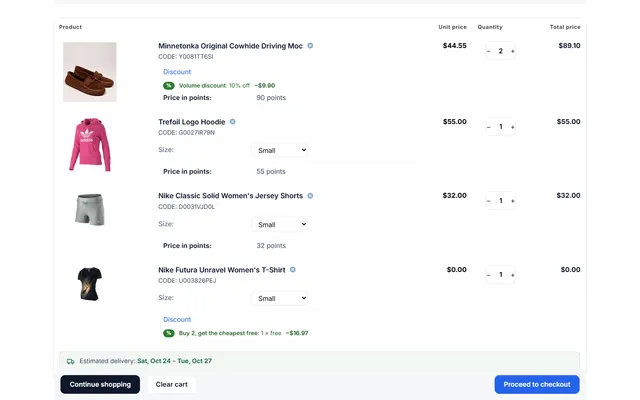
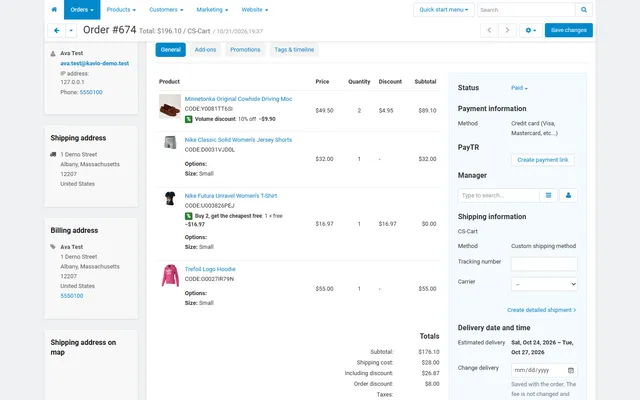
Cart, checkout and order details show a short note such as "Buy 2, get the cheapest free: 1 × free". Each vendor suborder gets exactly its share.
From the same set or another set, free or discounted, repeatable, with a limit.
Cheapest item free, most expensive first, or every N-th item discounted.
By quantity or spend: percent off, amount off each item or amount off the total.
Days and hours, including windows past midnight.
Uses per customer by account or e-mail, and a discount cap per promotion.
Line discounts with taxes, coupons, currencies and Multi-Vendor suborders handled.
Advanced Promotions: Buy X Get Y, Tiers, Schedules
CS-Cart’s promotion editor handles coupons, order discounts, free shipping and gifts well. It has no way to say "buy 2, get the cheapest free", "every third item half price", or "10% off from 3 items and 15% from 5". Stores end up with one add-on per offer type, or a discount on everything because that is the easy option.
Advanced Promotions adds new conditions and bonuses to the same editor. It does not replace anything: coupons, dates, priorities, user groups, storefronts and Stop other rules keep working, and you stay in Marketing, Promotions.
| Offer | Bonus or condition to use |
|---|---|
| Buy 2 get the cheapest free | Buy X get Y, same set, Free, Cheapest items first, Repeat on |
| Every third item half price | Buy X get Y, buy 2 get 1, 50% off |
| Buy a camera, bag at 30% off | Buy X get Y, another set for the get items |
| 10% from 3 items, 15% from 5 | Tiered discount, count by quantity, up to six rows |
| Spend 100 save 10, spend 200 save 25 | Tiered discount, count by subtotal, amount off the total |
| 20% off everything except sale items | Discount on a product set, with Skip sale items |
| Lunch-hour deal on weekdays | Day and time condition |
| At most three uses per customer | Uses per customer condition |
With the same set, every complete group of X + Y items earns Y discounted items, picked from the whole cart. Buy 2 get 1 free with 6 items gives 2 free. A limit (At most N times) and a discount cap keep the cost of a campaign known.
Time windows use the store time zone and can run past midnight: 22:00 to 02:00 belongs to the day it starts. New conditions combine with core ones in all or any groups.
Every condition and bonus works on a product set: all products, or selected products, categories (with subcategories) and, on Multi-Vendor, vendors. Exclusions then remove products, categories and vendors, and two switches protect margin: Skip items that already have a discount, and Skip sale items, meaning items with a list price above the price.
Free gift lines and zero-price lines are never counted or discounted, so a free gift cannot trigger another offer.
This is where promotion add-ons usually cause problems, so it is worth knowing. The discount of a line is spread over its units and written like a core product discount, so taxes use the discounted price in both tax calculation methods. Percentages come from the line’s current price, after catalog promotions and higher-priority promotions. A line never goes below zero.
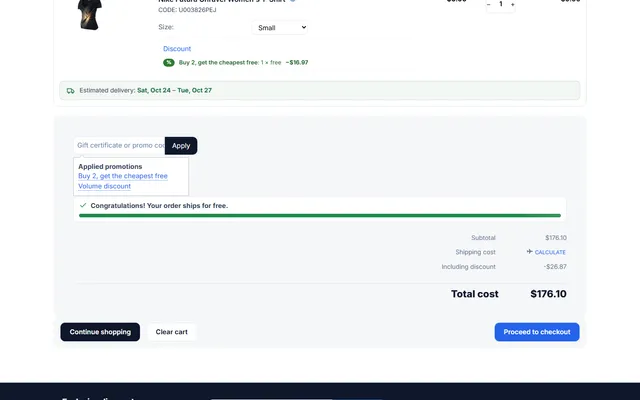
A discount that does not split evenly leaves a cent or two: one free item out of three at $16.97. With Exact order total, the default, the remainder goes into the order discount so the total is right, and you may see an order discount of $0.01. Round per unit avoids that line, but the total can differ by a cent.
Each discounted line carries a note in the cart, checkout and order details, for example "Buy 2, get the cheapest free: 1 × free −$16.97". Clear notes mean fewer questions. On Multi-Vendor, the split is kept exactly in every vendor suborder. With Direct Customer-to-Vendor Payments each vendor’s cart is calculated on its own, and vendors who may manage promotions see the same editor, limited to their own products.
| Core promotions | One add-on per offer | This add-on | |
|---|---|---|---|
| Buy X get Y | Free product only | Yes | Yes, with sets and repeat |
| Tier tables | No | Sometimes | Quantity or spend |
| Day and time windows | Dates | Sometimes | Weekday and time |
| Exclusions | Limited | Varies | Products, categories, vendors, sale items |
| Where you edit | Promotions | Several screens | Promotions |
If you run a seasonal coupon and nothing else, core promotions are enough. For bundle pricing on selected products, Frequently Bought Together & Cross-sell offers an optional bundle discount. If vendors want to run their own campaigns, see Vendor Coupons & Automatic Sales. Get Advanced Promotions on the store.
CS-Cart and Multi-Vendor 4.17.2 to 4.21.x on PHP 7.2.5 to 8.3. The add-on works inside the core promotion calculation, with no own tables or remote calls, and prints nothing on cacheable pages. On Ultimate, settings can differ per storefront. Turning off Apply the add-on’s conditions and bonuses stops only its offers; core promotions keep working.
CS-Cart
Buy X get Y, cheapest or N-th item free, tier tables, day and time windows, product sets with exclusions and per-customer limits as new conditions and bonuses of CS-Cart cart promotions. Exact to the cent, with discount notes in the cart and orders.
CS-Cart
The most requested products on this platform. Each one has its own page, and you can buy it straight on the sales site.
Payout schedules, hold periods, approval batches and SEPA or PayPal payout files, on top of core vendor accounting.
Commission by vendor, category, product, price or monthly sales on top of your vendor plans, with a simulator.
Decimal quantities with a unit, step, presets and price per kg or metre, with exact stock down to 0.001.
A Make an offer button with counter-offers, deadlines and a single-use agreed price; vendors answer their own offers.
Text, photo and choice fields on print areas with a live preview, server-rendered proofs and surcharges.
XRechnung, Factur-X/ZUGFeRD and Peppol BIS 3.0 e-invoices and credit notes from every order.
Prices, licences, full documentation and instant downloads are on the store.
cs-cart.kaviolabs.com · 98 add-ons · 29 themes
Advanced promotions
Built natively for each platform, not ported. Each version has its own product page, documentation and price.
OpenCart
Buy X get Y, tiers, bundles, free gifts and scheduled campaigns with badges and cart nudges.
FAQ
Yes. Core coupons, dates, priorities and the stop-other-rules option keep working.
Every vendor suborder gets exactly its share of the discount.
Yes. Pages stay cache-friendly.
Yes. Exclusions cover products, categories, vendors, already discounted items and sale items.
No. It adds conditions and bonuses to the core cart promotions. Coupons, dates, priorities, user groups and Stop other rules stay as they are.
A discount that does not split evenly over the units of a line leaves a cent or two. With Exact order total it goes into the order discount so the total is exact. Choose Round per unit if you prefer no such line.
Yes, unless the promotion uses Stop other rules. The coupon’s order discount is calculated on the already discounted subtotal.
Yes, in both tax calculation methods. The discount is part of the line price, like a core product discount.
The product page has the full documentation, screenshots and the changelog.
Kavio Labs
The same standards, the same support desk and one licence portal on every platform we build for.