Sell by Measure
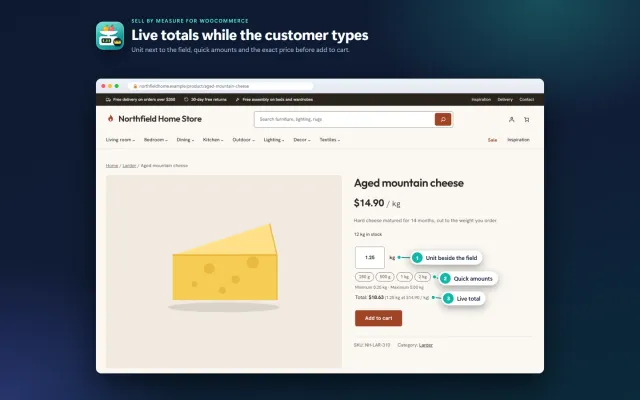
Decimal quantities like 1.25 kg, quick amounts, length × width and exact decimal stock, with the block checkout.
Platforms
 CS-CartAdd-ons and themes for CS-Cart and Multi-Vendor
 OpenCartExtensions and themes for OpenCart 4 and 3
 WooCommercePlugins and themes for WooCommerce
 PrestaShopModules and themes for PrestaShop 8.2 and 9
 ShopifyApps with a free plan
Stores
WooCommerce theme · Gloss
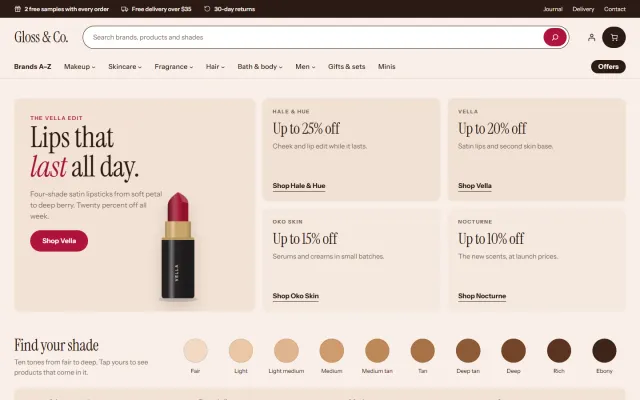
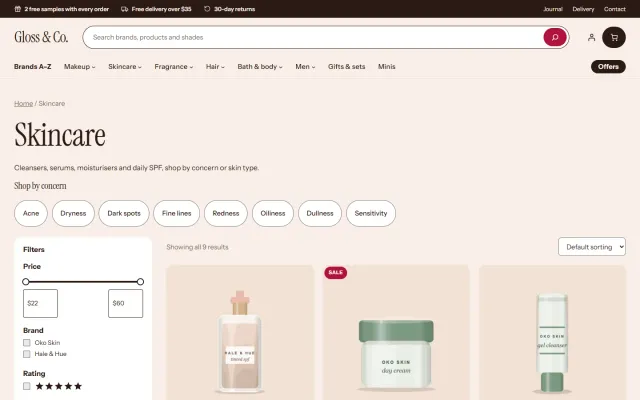
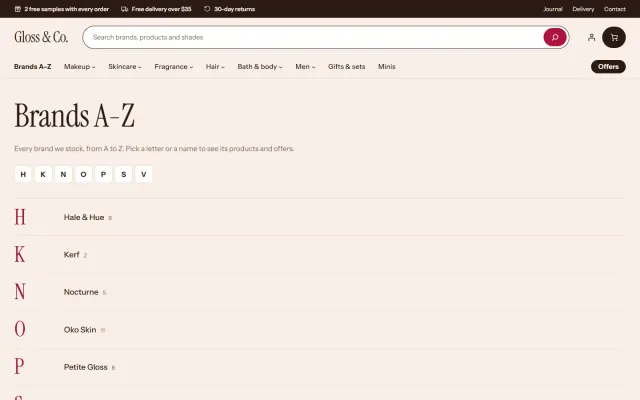
Gloss is a block theme for makeup, skincare, fragrance, hair and body care stores. Tinted counter plates behind every product, round shade swatches, a Brands A-Z list, a shade strip from fair to deep, a Top 10 chart, offers with their end dates and a routine builder that adds three products in one tap. Instrument Serif and Instrument Sans are self-hosted.

The problem
Beauty shoppers start from a brand or a shade, not a category. A general theme has no brand index and shows shades as a dropdown, so finding the right foundation takes many clicks.
They also compare sizes and prices: a 30 ml and a 50 ml bottle are only comparable with a price per ml, and an offer only works when its end date is visible.
Gloss: Beauty & Cosmetics Theme for WooCommerce
Upload the zip in Appearance > Themes, activate Gloss and choose Nude, Cherry, Peach or Noir in Appearance > Editor > Styles.
One click creates Gloss & Co.: 44 products from seven fictional brands in 25 categories, 19 with shade or size variations, real sale end dates, 165 reviews, five pages and three journal posts. One click removes it.
Brands come from Products > Brands, and shade swatches from a variation attribute named Shade (or Colour); the swatch colour is taken from the shade name.
The category bar starts with Brands A-Z, and a page lists every brand of the store alphabetically with a letter rail.
A campaign tile with four brand offers, a shade strip from fair to deep and a Top 10 chart with large serif numerals.
Tinted plates with a brand line, rating, price with the saving, price per ml, the end date of a sale and round shade dots.
A shade picker with large round swatches, size chips, delivery, samples and returns lines, and tabs for description, how to use and ingredients.
A routine builder that adds three products in one tap, an offers band with end dates and a free samples banner, all as patterns.
Nude, Cherry, Peach and Noir all meet WCAG AA contrast. Cart and Checkout blocks are styled with a minimal secure header.
Gloss: Beauty & Cosmetics Theme for WooCommerce
Beauty buyers shop by brand, shade and concern. A general theme offers a category menu and a colour dropdown, which is a poor way to choose a foundation. Gloss starts its category bar with Brands A-Z, and adds a shade strip from fair to deep, concern chips that open the filtered shop, a Top 10 chart, and a routine builder.
The product page has round shade swatches, size chips, price per ml, delivery and samples lines, how to use and ingredients. Those are the details that decide a sale in this sector.
Swatches, price per ml and the shade strip need data. Without it those elements are hidden, so plan attributes before you load products:
The demo content creates these for you, so importing it first gives you a working example of each: 44 products, 19 with shades or sizes, 25 categories, pages and posts.
It shows best sellers of three categories with checkboxes, a running total and Add routine to bag. It suits skincare, where a cleanser, serum and moisturizer sell together, and raises basket size without a discount.
Four styles, all at WCAG AA: Nude, Cherry, Peach and Noir. Colours, radius and the Top 10 numeral style change everywhere, including Cart and Checkout blocks. Fonts are Instrument Serif and Instrument Sans, self-hosted.
Page patterns include Brands A-Z, About us, Delivery and returns, and a Shade and skin guide. The hero mosaic has a campaign tile and four brand offer tiles to edit.
Product Personalizer adds engraving on fragrance or gift sets, and Make an Offer fits under the Add to bag button. Both inherit the colours of the active style.
| General theme | Gloss | |
|---|---|---|
| Shade swatches | Swatch plugin | Included |
| Price per ml | Custom work | From an attribute |
| Brands A-Z | Build it | Included |
| Routine builder | Bundle plugin | Included |
Ingredients and safety claims are your text, so make sure they are accurate for your market. Gloss is also on OpenCart and PrestaShop. Get Gloss on the store.
WordPress 6.7 or newer, WooCommerce 10.1 to 11.2, PHP 7.4 to 8.3. Neutral to HPOS, no external requests. No product photos are included. The demo uses generated illustrations of fictional brands.
Beauty shoppers buy on trust and on small details. Plan these before you load your catalog.
For search, shop-by-concern pages can reach shoppers that bare categories miss: "serum for dry skin", "fragrance-free moisturizer". Give each a short, honest introduction.
Samples and travel sizes lower the risk of a first order, especially for shades and fragrance, and a clear returns rule for opened products prevents disputes.
Reviews that mention skin type or shade are more useful than star ratings alone, so ask for those details when you request a review.
A theme change touches every page, so work on a staging copy first. Your licence covers a subdomain of your store.
Because everything is built from blocks and patterns, there is no page builder to keep updated, and your content stays yours if you change theme later.
WooCommerce
Block theme for beauty and cosmetics stores: a Brands A-Z list, a brand offer mosaic with end dates, a shade strip, product cards on tinted plates with…
WooCommerce
The most requested products on this platform. Each one has its own page, and you can buy it straight on the sales site.
Decimal quantities like 1.25 kg, quick amounts, length × width and exact decimal stock, with the block checkout.
XRechnung, ZUGFeRD/Factur-X and Peppol BIS 3.0 from every order, created on your own server.
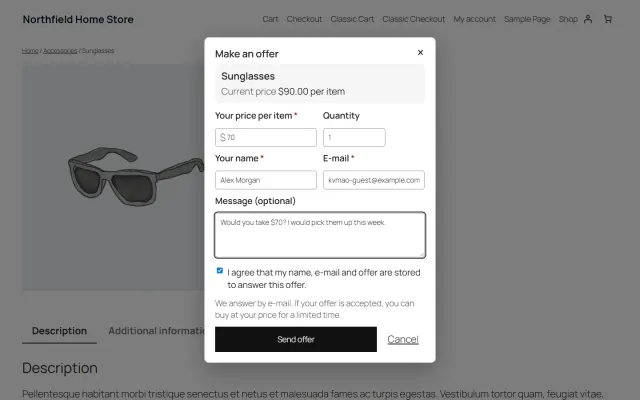
A Make an offer dialog with counter-offers and hidden rules; the agreed price is enforced only in that shopper’s cart.
Year, make and model search, My Garage, a fit badge on every product and CSV import for large fitment files.
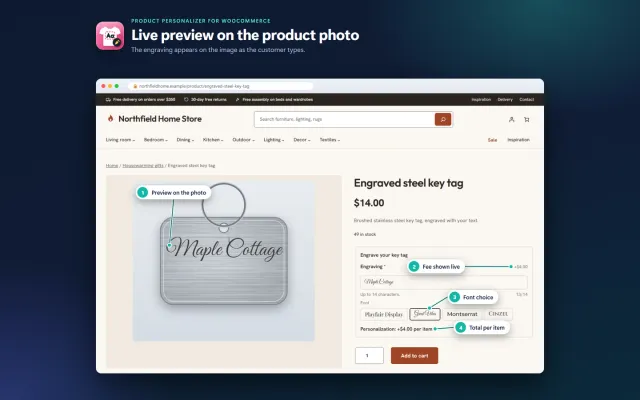
Names, dates and monograms previewed on the product image, with server-checked fees and the block checkout.
A classic, conversion-first block theme for parts stores, with a garage finder, a fit check on every product and four styles.
Prices, licences, full documentation and instant downloads are on the store.
woocommerce.kaviolabs.com · 7 plugins · 11 themes
FAQ
From a variable product with a variation attribute named Shade (or Colour). The swatch colour is taken from the shade name.
Yes. Engraving and monograms on gift sets and fragrance, and negotiated prices on gift sets and multi-buys, are styled to fit. Both are separate products and Gloss does not depend on them.
Gloss is designed for the WooCommerce Cart and Checkout blocks, which are the WooCommerce default.
WooCommerce 10.1 to 11.2 on WordPress 6.7 or newer, with PHP 7.4 to 8.3. It is a block theme, so full site editing is part of it.
The store keeps working. Templates, patterns and styles stay and the admin is never blocked; the shade list falls back to the normal select, and updates, the demo importer and the routine builder button need a valid licence.
Swatches need a variable product with a variation attribute called Shade. Without it, WooCommerce shows its normal select.
They link to standard WooCommerce layered navigation, which needs global attributes with those slugs. The demo content creates them.
Yes. Templates and styles are general, and all home sections are editable.
The product page has screenshots of every style, the full documentation and the changelog.
Kavio Labs
The same standards, the same support desk and one licence portal on every platform we build for.