Sell by Measure
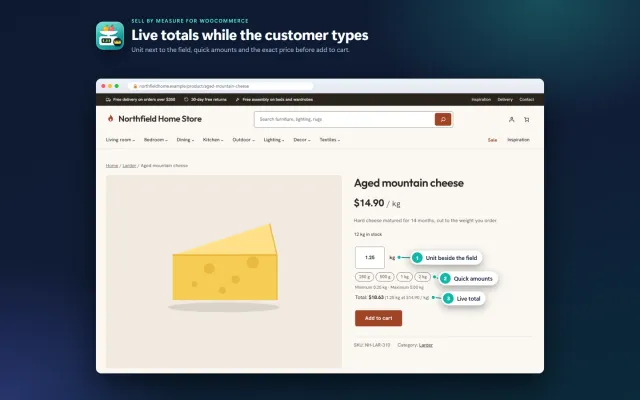
Decimal quantities like 1.25 kg, quick amounts, length × width and exact decimal stock, with the block checkout.
Platforms
 CS-CartAdd-ons and themes for CS-Cart and Multi-Vendor
 OpenCartExtensions and themes for OpenCart 4 and 3
 WooCommercePlugins and themes for WooCommerce
 PrestaShopModules and themes for PrestaShop 8.2 and 9
 ShopifyApps with a free plan
Stores
WooCommerce guide · Make an Offer
Shoppers propose a price per item for the product, variation and quantity they choose. You accept, counter or decline in WooCommerce > Offers or straight from the e-mail, or hidden rules answer at once. The agreed price works only in that shopper’s cart, once, until the deadline.


The problem
A negotiation only works if the agreed price reaches the right shopper’s cart, for the right quantity, and only once. Otherwise the deal leaks to other shoppers, or the order total does not match what was agreed.
That is why most stores negotiate by e-mail and create a coupon by hand. It works for one deal a week, not for a steady flow of offers.
Make an Offer for WooCommerce
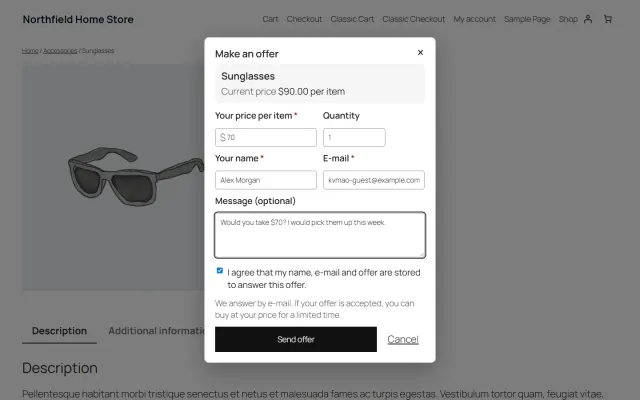
A Make an offer dialog below Add to cart asks for a price per item, a quantity and an optional message. Guests and signed-in customers can offer, for simple and variable products.
Accept, counter or decline in WooCommerce > Offers, or from the signed links in the store e-mail. Or set a hidden minimum price and auto-accept and auto-decline percentages per product, category or store.
An accepted offer can be bought only at the agreed price, only by that shopper, only for the offered quantity, once and until the deadline.
A hidden minimum price, auto-accept and auto-decline percentages per product, category or store. Shoppers never see your thresholds.
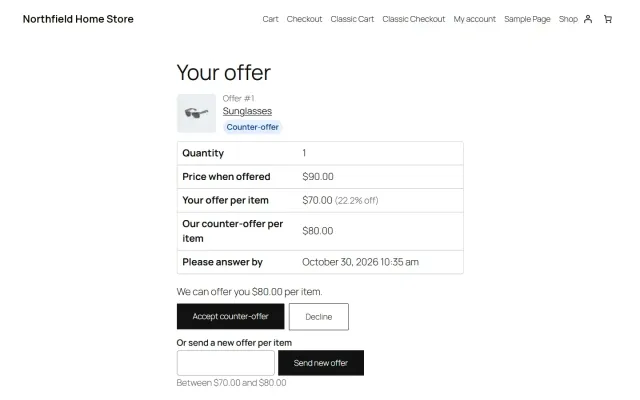
Rounds with deadlines on both sides, and a customer offer page and My Account > Offers to accept, decline, send a new offer or buy.
The offer, the access to it and the cart price are all verified on the server; a forged or copied cart line falls back to the normal price.
WooCommerce > Offers with status filters, search, acceptance rate, revenue from offers and CSV export.
Limits per customer, product and connection, a honeypot, hashed IP addresses, and GDPR export, erase and retention.
Cart and Checkout blocks, classic shortcodes, block and classic themes, High-Performance Order Storage, and eight editable WooCommerce e-mails.
Make an Offer for WooCommerce
Offers suit products where the price is genuinely flexible: used goods, antiques, furniture, high-ticket items and end-of-line stock. They do not suit low-margin consumables, where answering costs more than the sale. Because the button can be limited to chosen products and categories, you do not have to open the whole store.
Free basic offer plugins exist. They typically stop at sending you a request. The harder parts are what happens next: making sure only that shopper gets that price, for that product, once, including in block carts.
The agreed price is enforced on the server: only that shopper, that product and variation, up to the offered quantity, until the deadline, once. It works in the block cart through the Store API, not only on classic pages.
| Setting | Default | Note |
|---|---|---|
| Offers on | All simple and variable products | Or only with the rule Offers on |
| Auto-accept at | Empty | For example 90% of the current price |
| Auto-decline below | 50% | Polite e-mail, sent at once |
| Counter-offers per offer | 3 | 0 means accept or decline only |
| Days to answer | 7 | 3 days for the customer on counter-offers |
| Hours to buy | 48 | After that the offer expires |
| Coupons | Off | Coupons do not reduce offer-price items |
Rules resolve field by field: product, then nearest category, then settings. The product tab shows the rule now in effect. A hidden minimum price per item accepts at once and beats the percentage. Shoppers never see your thresholds.
Spam controls: five open offers per customer, three per product in 30 days, 10 per connection per hour, a honeypot and a security token. IP addresses are stored only as a keyed hash. Personal data of closed offers is erased after 365 days by default, and prices stay for the statistics. Eight WooCommerce e-mails are editable as usual.
| Coupon by e-mail | Basic offer form | Make an Offer | |
|---|---|---|---|
| Automatic answers | No | Rarely | Yes |
| Counter-offers with deadlines | No | Rarely | Yes |
| Tied to one shopper and product | If set up | Varies | Yes, on the server |
| Block cart | Yes | Check first | Yes |
| Statistics and CSV | No | Varies | Yes |
If you only receive a couple of requests a month, a contact form and a private coupon are fine. Once offers repeat, tracking them in one list pays off. The settings guide covers discount levels by margin. Get Make an Offer on the store.
WooCommerce 10.1 to 11.2, WordPress 6.7 or newer, PHP 7.4 to 8.3, HPOS, Cart and Checkout blocks, Store API, block and classic themes. Grouped and external products never get the button. The button text is yours to change, and themes such as Hearth, Gloss and Mono style it to match. GDPR export and erase tools are included; what your privacy notice must say is for your adviser.
There is no universal right number. It depends on your margin, so work from cost rather than from the list price.
Decide also how sale items behave. Percentages compare with the current price, sale price included, so an offer at 90% on a discounted item is 90% of the sale price.
Watch the statistics after a month. If almost every offer is accepted, your minimum may be too low or your list price too high. If few are, the button may be raising expectations you do not meet. Our settings guide goes through this in more detail.
WooCommerce
Shoppers propose their own price per item for the chosen variation and quantity; you accept, counter or decline in the admin or from the e-mail, or hidden…
WooCommerce
The most requested products on this platform. Each one has its own page, and you can buy it straight on the sales site.
Decimal quantities like 1.25 kg, quick amounts, length × width and exact decimal stock, with the block checkout.
XRechnung, ZUGFeRD/Factur-X and Peppol BIS 3.0 from every order, created on your own server.
Year, make and model search, My Garage, a fit badge on every product and CSV import for large fitment files.
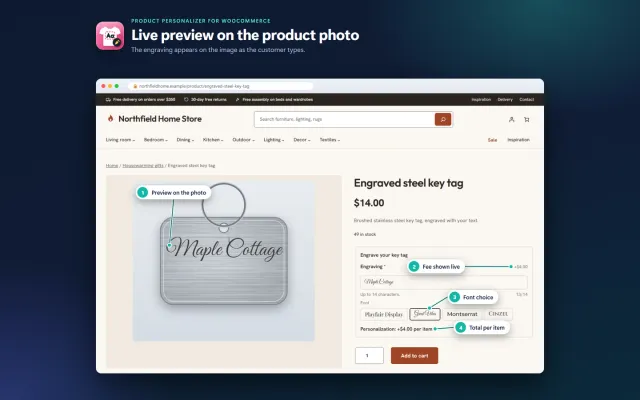
Names, dates and monograms previewed on the product image, with server-checked fees and the block checkout.
A classic, conversion-first block theme for parts stores, with a garage finder, a fit check on every product and four styles.
A warm, photo-led block theme for furniture and homeware, with shop by room tiles, filters and four styles.
Prices, licences, full documentation and instant downloads are on the store.
woocommerce.kaviolabs.com · 7 plugins · 11 themes
Make an offer
Built natively for each platform, not ported. Each version has its own product page, documentation and price.

CS-Cart
A Make an offer button with counter-offers, deadlines and a single-use agreed price; vendors answer their own offers.
OpenCart
Shoppers propose a price; you accept, counter or decline, and the agreed price is applied once in the cart.
PrestaShop
A Make an offer button with negotiation rounds; the agreed price is a specific price bound to one cart.
Guide
Guide
Hidden minimums, auto-accept and auto-decline thresholds, deadlines and limits that keep offers profitable.
Read the guideFAQ
No. WooCommerce has coupons and sale prices, but no way for shoppers to propose a price. A plugin adds the button and the negotiation.
No. The offer, the rules and the cart price are checked on the server, and the cart line is tied to the offer’s secret key.
Not by default: coupons skip offer items and are refused when only offer items are in the cart. You can allow them.
Yes. The dialog fetches a fresh security token and the price when it opens, and the offer pages are never cached. It is tested with block and classic cart and checkout, with HPOS on.
Simple and variable products with a price. Grouped and external products, and products without a price, never show it.
Yes. The new offer e-mail has signed Accept, Counter-offer and Decline links that work without signing in.
Yes, per product. Offers at or above it are accepted at once, and shoppers never see it.
Name, e-mail and messages of closed offers are erased after 365 days by default. Prices stay for statistics.
Yes. Set Offers on to products and categories with the rule, then switch it on for that category.
The product page has screenshots, the full documentation and the changelog.
Kavio Labs
The same standards, the same support desk and one licence portal on every platform we build for.