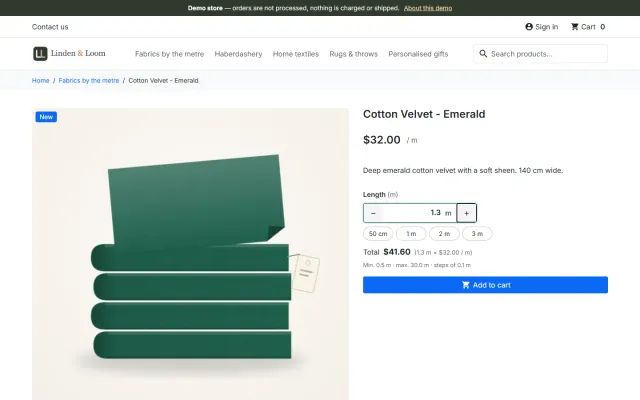
Sell by Weight & Length
Amounts like 1.25 kg or 2.40 m with quick amounts, a live total, exact decimal stock and real shipping weight.
Platforms
 CS-CartAdd-ons and themes for CS-Cart and Multi-Vendor
 OpenCartExtensions and themes for OpenCart 4 and 3
 WooCommercePlugins and themes for WooCommerce
 PrestaShopModules and themes for PrestaShop 8.2 and 9
 ShopifyApps with a free plan
Stores
PrestaShop theme · Axle
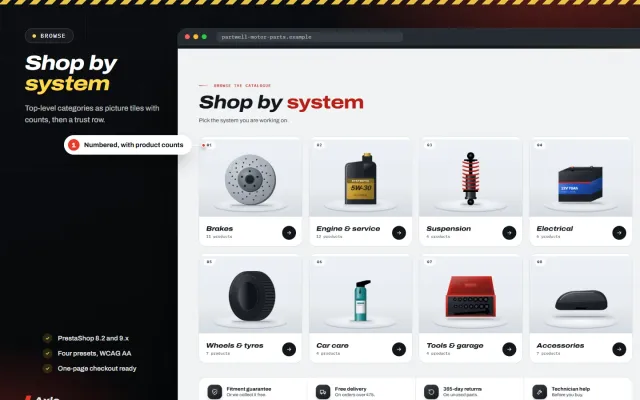
Axle is a premium design for shops where the first question is whether a part fits. Shoppers choose a vehicle once in the garage finder, see fitment on every part and can search by part number, OE number or tyre size. A garage finder in the header and under the home hero, a Fits your vehicle badge on every card, a fit check with a vehicle table and OE numbers on the product page, plate cards on steel wells, Shop by system tiles and a Complete the job builder. A child theme of Classic, so one package runs on PrestaShop 8.2 and 9.x.


The problem
Nobody wants a part that does not fit. A general theme shows a grid of products and leaves the compatibility question to the description, so shoppers either guess or write to you before every order.
Parts are also found by number. Customers arrive with a part number, an OE number or a tyre size, and a plain search box does not treat those as first-class ways to look.
Axle: Auto Parts Theme for PrestaShop
In Design > Theme & Logo click Add new theme, upload the zip and choose Use this theme. The companion module is installed for you; add your licence key, choose a preset and regenerate the thumbnails once.
Create a feature named Fits vehicle with one value per vehicle, named Make · Model · Engine · Years. On each product assign every vehicle it fits. Axle only reads these values and adds no tables to your database.
Features named OE numbers, Universal fit and Volume drive the number chips, the verdicts and the price per litre. Sale countdowns come from percentage specific prices with an end date. One button imports the Partwell Motor Parts demo content: fifty-five parts and eleven fictional vehicles.
Pick make, model, year and engine from your own vehicle list. The vehicle is remembered in the browser and shown in the header as My garage. Two more tabs search by part or OE number and by tyre size such as 205/55 R16.
With a vehicle saved each card says Fits your vehicle, May not fit or Universal fit. Without a vehicle it offers Check fit. Category and search pages get a vehicle bar with Show only parts that fit.
A fit check under the price, a Fitment tab with the table of vehicles (yours highlighted), OE and cross-reference numbers as chips, a boxed fitment note and the part number line.
White plates with the brand line, the part number in monospace, price, regular price, price per litre and labels for sale percentage, New, OE quality and Kit, plus offer countdowns.
A campaign hero with a countdown and four brand deal tiles, the garage finder band, Shop by system tiles, popular jobs, a deals band and a Complete the job builder with one Add the set to cart.
Redline, Pitlane, Overland and Nightshift all meet WCAG AA contrast. Archivo and IBM Plex Mono are served from your own store. Works with the classic checkout and the PrestaShop 9.2 one-page checkout. No core file changes.
Axle: Auto Parts Theme for PrestaShop
Axle is built around one question: does it fit my car? Shoppers choose a vehicle once, and every part answers. The garage finder takes make, model, year and engine from your own vehicle list, remembers the vehicle in the browser, and has tabs for part or OE number and tyre size.
Every card then says Fits your vehicle, May not fit, Universal fit or Check fit. Listing pages get a vehicle bar with Show only parts that fit. The product page has a fit check under the price, a Fitment tab with your vehicle highlighted, OE and cross-reference chips, a boxed fitment note, price per litre for fluids, a delivery panel, and tabs for fitting tips and what is in the box.
On PrestaShop, Axle includes a bulk tool. Under Catalog, Vehicle fitment you can import thousands of rows from a CSV file, with a preview of every row before anything is written, Merge or Replace, an error report with row numbers, and an export that imports back unchanged. One product can take many vehicles.
It stores vehicles as a feature named Make · Model · Engine · Years. Axle does not include a vehicle database, and without that feature the finder, badges and fit check are simply not shown.
The fitment CSV guide explains how to structure such data.
| Classic plus a module | Axle | |
|---|---|---|
| Garage finder | Module | Included |
| Fit badges on cards | Module | Included |
| Fitment CSV import | Module | Included |
| Complete the job | No | Included |
Complete the job takes two to four products, with a live total and one Add the set to cart. The home page has a campaign hero with brand deal tiles, shop by system tiles, popular jobs, quick fixes under a price you set, a deals band and a brands grid. Plate cards show the part number in monospace, brand line, rating, price with the saving, and labels for sale, New, OE quality and Kit.
Presets at WCAG AA contrast: Redline, Pitlane, Overland and Nightshift. The Axle Store Kit on the packages page adds Make an Offer and Abandoned Cart Recovery. Get Axle on the store. Also on OpenCart and WooCommerce.
A parts store lives or dies on its data. Before you worry about the design, get these basics right.
For search traffic, write a short guide per system or per common job, such as how to choose brake pads, and link to the right category. Long lists of model names with no useful text rarely hold up over time.
If you sell to workshops as well as drivers, decide early whether trade customers get their own prices, and whether you show prices with or without tax.
Finally, keep your data honest. If you are not sure a part fits a vehicle, leave the vehicle out. One careful list beats a long one that creates returns.
PrestaShop 8.2 and 9.x, as a child theme of Classic, including the 9.2 one-page checkout. No core changes and no overrides. Archivo and IBM Plex Mono ship with it. The demo, Partwell Motor Parts, has eight systems, fifty-five parts from fictional brands, and fitment for eleven fictional vehicles, with one-click removal.
Try the theme on a copy of your shop first. Local development hosts and subdomains of your licensed domain are covered.
A child theme keeps your changes apart from Classic, so a PrestaShop update does not overwrite them. Avoid editing Classic itself.
PrestaShop
Auto parts and accessories store theme for PrestaShop 8.2 and 9.x: a garage finder with a saved vehicle, fitment badges on every card, a fit check with a…
PrestaShop
The most requested products on this platform. Each one has its own page, and you can buy it straight on the sales site.
Amounts like 1.25 kg or 2.40 m with quick amounts, a live total, exact decimal stock and real shipping weight.
A Make an offer button with negotiation rounds; the agreed price is a specific price bound to one cart.
Names, dates and initials previewed on the product image, with fees checked on the server and a production sheet.
Factur-X/ZUGFeRD, XRechnung and Peppol BIS 3.0 e-invoices with your PrestaShop invoice numbers.
Up to three reminders, single-use vouchers, a signed restore link and recovered revenue per reminder.
A lookbook-style fashion theme for Classic-based shops, with colour swatches, size chips and four presets.
Prices, licences, full documentation and instant downloads are on the store.
prestashop.kaviolabs.com · 14 modules · 11 themes
FAQ
No. It is a child theme of Classic plus a small module. It edits no core files, no other module and no Classic file, and it uses no overrides.
From one product feature, named Fits vehicle by default. Each value is a vehicle named Make · Model · Engine · Years, and each product carries the values of the vehicles it fits. Axle only reads them.
The finder uses the shop search. Put OE numbers in a feature named OE numbers and the search finds them once the search index is rebuilt.
No. It shows the fitment data you enter, so only list vehicles you have checked and keep the fitment guarantee line only if you offer one.
No. It stays in the visitor’s browser and is only used to show badges and the fit check.
The shop keeps working. Templates and styles stay; the garage, the fitment badges, the home page sections, labels, countdowns, product page extras and the presets other than Redline are switched off until the licence is valid again.
Yes. Catalog, Vehicle fitment imports CSV files with a preview, Merge or Replace, an error report and an export.
No. You add the vehicles your parts fit.
It filters the products on the current page. PrestaShop’s faceted search is a separate module.
No. The data is whatever you enter, so only list vehicles you have checked.
The product page has screenshots of every preset, the full documentation and the changelog.
Kavio Labs
The same standards, the same support desk and one licence portal on every platform we build for.