Sell by Weight & Length
Decimal quantities in 15 units, preset buttons, a live line total and exact decimal stock, on OpenCart 4 and 3.
Platforms
 CS-CartAdd-ons and themes for CS-Cart and Multi-Vendor
 OpenCartExtensions and themes for OpenCart 4 and 3
 WooCommercePlugins and themes for WooCommerce
 PrestaShopModules and themes for PrestaShop 8.2 and 9
 ShopifyApps with a free plan
Stores
OpenCart guide · Make an Offer
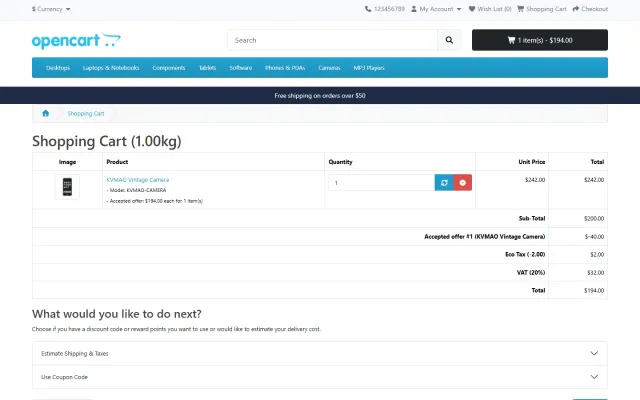
A Make an offer button below Add to Cart, an offers inbox with statistics, counter-offers with deadlines, and an agreed price applied as an "Accepted offer" line in the order totals: for that shopper, those options and that quantity, once.
The problem
OpenCart has specials, discounts and coupons, but no way for a shopper to propose a price. Offers arrive by e-mail and end in a coupon code.
Coupon codes can be shared, and nothing ties the deal to the product, options and quantity that were agreed.
Make an Offer for OpenCart
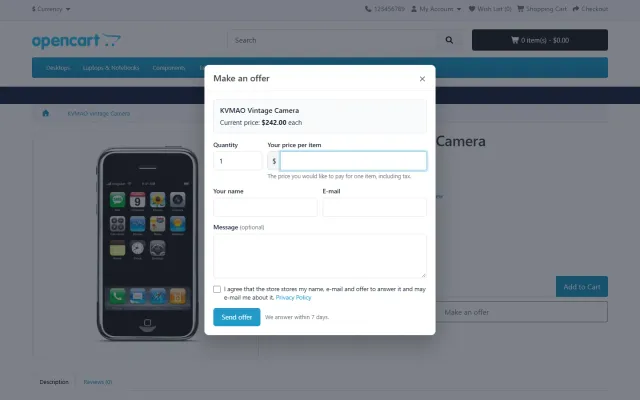
A dialog for the selected options and quantity: price per item and an optional message. Guests enter their name and e-mail and give consent.
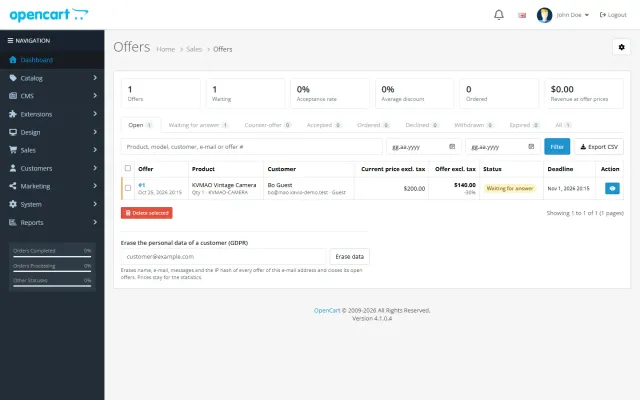
Accept, counter or decline in Sales > Offers. A hidden minimum price per product and auto-accept or auto-decline percentages answer at once.
One click puts the item in the cart; the "Accepted offer" total line applies the agreed price once, for that shopper and up to the offered quantity.
Status tabs, acceptance rate, average discount, revenue at offer prices, filters and CSV export.
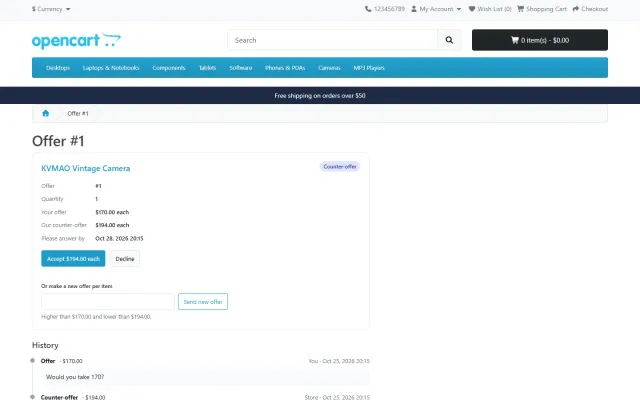
Counter-offers with a limit on rounds; the customer accepts, declines or makes a higher offer.
Hidden minimum price per product, auto-accept and auto-decline per category or store-wide.
Signed link, owner check, exact options, quantity and deadline; a second order with the same offer goes to your fraud status.
Received, accepted, counter-offer, declined, expired and messages, editable in the Language Editor.
Consent for guests, no raw IP addresses stored, automatic erasure after a retention period.
Make an Offer for OpenCart
OpenCart has no way for a shopper to name a price. A contact form gets you an e-mail, and then you have to issue a coupon anyone can reuse, or edit an order by hand.
This extension adds a button below Add to Cart. The shopper offers a price for the options and quantity they chose, you answer from one inbox, and an accepted offer becomes a single-use price in the cart. It suits high-value goods, end-of-line stock and bulk quantities, and you can limit it to the products and categories you choose.
The agreed price shows as a negative order total line, such as "Accepted offer #12", below the sub-total. This is deliberate: the product price stays the same, it works with every theme and payment method, and taxes are calculated on the agreed price. It covers the exact product and options, up to the offered quantity.
A second order with the same offer goes to your fraud status, as a used coupon does, and a canceled order gives the offer back.
| Setting | Default | Note |
|---|---|---|
| Status | Disabled | Enable after installing. |
| Offers on | All products | Or only with the rule Offers on. |
| Auto-accept at | Empty | For example 90% of the current price. |
| Auto-decline below | 50% | A polite e-mail goes out at once. |
| Counter-offers | 3 | 0 means accept or decline only. |
| Days to answer | 7 | And 3 days for the customer. |
| Hours to buy | 48 | Single use within this time. |
| Maximum quantity | 10 | Stock is checked as well. |
The current price includes special prices, quantity discounts and option prices. Rules work per product, per category or store-wide, and a hidden minimum price per product accepts offers at or above it. Shoppers never see these values.
Against abuse: one open offer per product and options, five open offers per customer, three per product in 30 days, 10 guest offers per connection per hour, and a hidden spam trap. No raw IP addresses are stored, and personal data of closed offers is erased after 365 days by default.
The inbox has status tabs, a pending badge in the menu, and statistics including acceptance rate, average discount and revenue at offer prices, with CSV export.
OpenCart 4 closes expired offers with its cron job. OpenCart 3 has no cron, so it closes them when the admin or an offer page is opened. Coupons, vouchers and gateways work as usual with the offer total. Advanced Promotions works on the price after accepted offers, and Abandoned Cart Recovery leaves offer-priced products out of its coupons, so there is no double discount.
| Coupon by e-mail | Make an Offer | |
|---|---|---|
| Tied to one shopper and product | Hard to set up | Yes |
| Automatic answers | No | Yes |
| Counter-offers | By e-mail | Built in |
| Deadline and single use | Partly | Yes |
| Figures | Coupon report | Offer statistics |
The Make an Offer settings guide covers discount levels by margin. Get Make an Offer on the store.
Start from your margin, not from a round percentage. The auto-decline default of 50% suits a store with healthy margins, but a store on 20% margin should raise it, or switch offers off on those products. Set a hidden minimum on your most expensive items, where a quick yes wins the sale. Answer pending offers within a day or two, because a shopper who is waiting is also comparing.
For a store with many categories, use category rules rather than product rules. They take minutes to set, and each field resolves separately, so you can keep a store-wide auto-decline and vary only auto-accept.
OpenCart 4.0.2 to 4.1.x and 3.0.3 to 3.0.5, with separate packages in one licence. Tested on 4.1.0.4 and 3.0.5.1. OpenCart events and a standard order total, with no core changes, no OCMOD and no theme edits.
OpenCart
Shoppers propose a price; the store accepts, declines or counters, and the agreed price is enforced in the cart once (OpenCart 4.x and 3.0.x).
OpenCart
The most requested products on this platform. Each one has its own page, and you can buy it straight on the sales site.
Decimal quantities in 15 units, preset buttons, a live line total and exact decimal stock, on OpenCart 4 and 3.
Buy X get Y, tiers, bundles, free gifts and scheduled campaigns with badges and cart nudges.
A grocery theme with aisle bubbles, stepper cards with unit prices, recipe add-all and a phone basket bar.
Up to three reminders, single-use coupons, a restore link and a recovered-revenue dashboard.
A spreadsheet grid for prices, specials, stock and options, with bulk actions, preview and undo.
Names, dates and monograms previewed on the product photo, with fees, a word filter and a production sheet.
Prices, licences, full documentation and instant downloads are on the store.
opencart.kaviolabs.com · 16 extensions · 11 themes
Make an offer
Built natively for each platform, not ported. Each version has its own product page, documentation and price.

CS-Cart
A Make an offer button with counter-offers, deadlines and a single-use agreed price; vendors answer their own offers.
WooCommerce
A Make an offer dialog with counter-offers and hidden rules; the agreed price is enforced only in that shopper’s cart.
PrestaShop
A Make an offer button with negotiation rounds; the agreed price is a specific price bound to one cart.
Guide
Guide
Hidden minimums, auto-accept and auto-decline thresholds, deadlines and limits that keep offers profitable.
Read the guideFAQ
OpenCart has no event inside the cart library. A total line works on every OpenCart 4 and 3 store, together with coupons, vouchers and other extensions, and payment gateways receive the correct order total.
No. It applies once, to the shopper who made it (or the browser that opened the signed e-mail link), for the offered product, options and quantity, until the deadline.
The offer discount is calculated against the current cart price, which already includes specials and quantity discounts. Coupons apply on top unless you restrict them.
No. It uses OpenCart events and a standard order total, without OCMOD.
Yes, if you allow it. They enter their name and e-mail and tick the consent box. Otherwise they are asked to sign in.
Set Offers on to the option for products and categories with the rule, then switch offers on where you want them.
They are closed when the admin or an offer page is opened, since OpenCart 3 has no cron.
Yes. Sales, Offers shows acceptance rate, average discount, ordered offers and revenue at offer prices, with CSV export.
See the offer screens and read the full documentation on the product page.
Kavio Labs
The same standards, the same support desk and one licence portal on every platform we build for.